Guides
Notion Proposal Template: Write, Price, and Send It as a PDF
Build a Notion proposal template with scope, pricing, and an expiry date, then send it to clients as a clean, professional PDF.
By Sanat Biswal · 2026-10-11 · 5 min read

{/ synced-from-notion — do not edit manually /}
You spend 2 evenings writing a proposal. You then send the client a Notion link, feeling optimistic that the proposal looks solid enough to take the business forward. But, then you hear the reply comes: “I can’t open this on my phone,” or worse, “Is this the final version? It looks different from yesterday.”
Notion is a great place to write a proposal. It’s a poor way to deliver one. The trick is to build the proposal once as a reusable template, keep the pricing honest with a few formulas, and send the client something that looks the same on every device.
Short answer: Create a Proposals database with properties for client, project, status, total, date sent, and valid until. Build a database template with sections for the summary, scope, timeline, pricing, terms, and next steps. Use a formula to calculate the expiry date, then export the page as a PDF or generate it from a template with PDFOutput.
In more detail: A Notion proposal template is a database plus a page layout. The database holds one record per proposal and tracks where each one stands. The page layout keeps the writing consistent, so you only change what’s specific to the client.
For pricing, a linked Line Items database lets Notion add up the total. When it’s time to send, a PDF is safer than a link because it can’t change after the client opens it. You can export the page from the ••• menu, or keep the layout in a Google document, Word file, PDF, or Notion page and let PDFOutput fill it with the proposal’s values.
Proposal or Quote? Pick the Right One
People use these words loosely, and the wrong choice makes the document feel off.
| Quote | Proposal | |
|---|---|---|
| Answers | “How much will it cost?” | “Why you, and how will you do it?” |
| Length | One page, usually | Two to five pages |
| Contains | Items, prices, validity date | Problem, approach, timeline, pricing, terms |
| Best for | Clear, repeatable jobs | Projects that need convincing |
What Goes in the Page
Most proposals that get accepted follow a simple order. Here’s a skeleton you can paste into your template.
| Summary | What the client needs, in 2 or 3 sentences |
|---|---|
| Scope | What’s included, and what isn’t |
| Timeline | Key milestones with dates |
| Pricing | Fixed price or itemized breakdown |
| Terms | Payment schedule, revisions, how changes are handled |
| Next steps | One clear action: “Reply to confirm” or “Sign below” |
That “what isn’t included” line in the scope section is the most underrated one. It prevents about half of the arguments that start with “I thought that was part of it.”
Set Up the Proposals Database
| Property | Type | Notes |
|---|---|---|
| Project Name | Title | What the client will recognize |
| Client | Relation or text | Link to a Clients database if you have one |
| Status | Select | Draft, Sent, Accepted, Declined |
| Date Sent | Date | The day it goes out |
| Valid Until | Formula | See below |
| Total | Number or rollup | Fixed price, or the sum of line items |
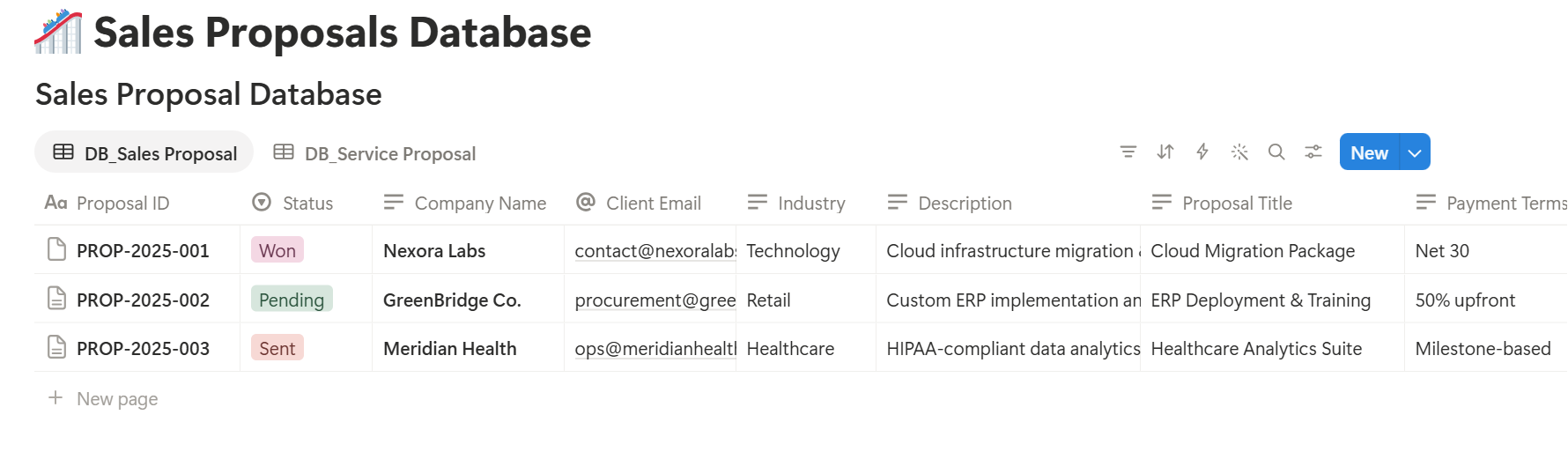
| Proposal PDF | Files and media | Where the finished file goes |
**Valid Until: dateAdd(prop("Date Sent"), 14, "days") Expired flag: if(prop("Status") == "Sent" and prop("Valid Until") < now(), "Expired", "")**
A validity date gives the client a gentle reason to decide, and it protects you if your costs change. Fourteen days is only an example, so use whatever fits your work.
Pricing That Doesn’t Fall Apart
You have three common choices.
prop("Quantity") * prop("Rate")), relate it to the proposal, and roll up the amounts into the Total.Whichever you choose, enter a test proposal and check the total against a calculator before you send anything real.
Pro Tip: Write the pricing last. Once the scope and timeline are clear, the number is easier to defend, and you'll catch missing items while you list them.
Track Every Proposal Until It Closes
A proposal that sits unanswered usually isn’t a “no.” It’s a forgotten “maybe.” Add these views so nothing slips:
- Waiting on a reply: a table filtered to Status is Sent, sorted by date sent, oldest first.
- Pipeline: a board grouped by Status, so you can drag a proposal to Accepted or Declined.
- Expiring soon: a table filtered to proposals whose valid-until date falls in the next week.
- Ready to Generate creates a PDF from the database record.
- Generate Page converts the Notion page into a PDF.
- Generate PDF and Doc creates a PDF and a Google document.
- Preview creates a Google document so you can check it before the final PDF.
- Generate E-Signed Doc creates an e-signed PDF in the database workflow.
- Sending a Notion link instead of a PDF. Pages change, links break, and phones struggle. A PDF stays put.
- Leading with your history. Open with the client’s problem. They care about that first.
- Leaving out what’s excluded. An unclear scope is a future disagreement.
- No validity date. Prices and availability change. Say how long the offer stands.
- Ending without a next step. Tell the client exactly what to do: reply, sign, or book a call.
- Skipping the test. Send a sample to yourself and read it on your phone.
- Notion Receipt Template
- How to Export a Notion Database to PDF
- How to Add Your Logo and Brand Colors to Notion PDFs
- Notion to Google Docs
Check the first view on Monday mornings. A short follow-up message a week after sending is often all it takes.
Send It as a PDF
A PDF is what clients expect, and it gives you a clean record of exactly what they saw.
Built-in export. Open the proposal page, click •••, choose Export, and set the format to PDF. It works for the occasional proposal.
For the settings, see How to Export Notion to PDF, and if something looks wrong, Notion PDF export not working covers the usual fixes.
A template-based tool. If proposals are a regular part of your week and you want your logo and colors on each one, build the layout once and fill it automatically.
How to Add Your Logo and Brand Colors to Notion PDFs explains why that beats fighting the built-in export.
Generating Proposals with PDFOutput
PDFOutput generates documents from Notion data using a template. The template can be a Google document, Word file, PDF file, or Notion page. You mark where data goes with placeholders in double curly braces, such as {{Project_Name}} and {{Total}}, and each placeholder has to match the related Notion property name.
You start generation from a Notion database button or a status property. A few of the status options:
That last option fits proposals well, since the natural end of a proposal is a signature. Finished files can be saved to a database property, like the Proposal PDF property above, or to a Google Drive folder with the link stored in a database property.
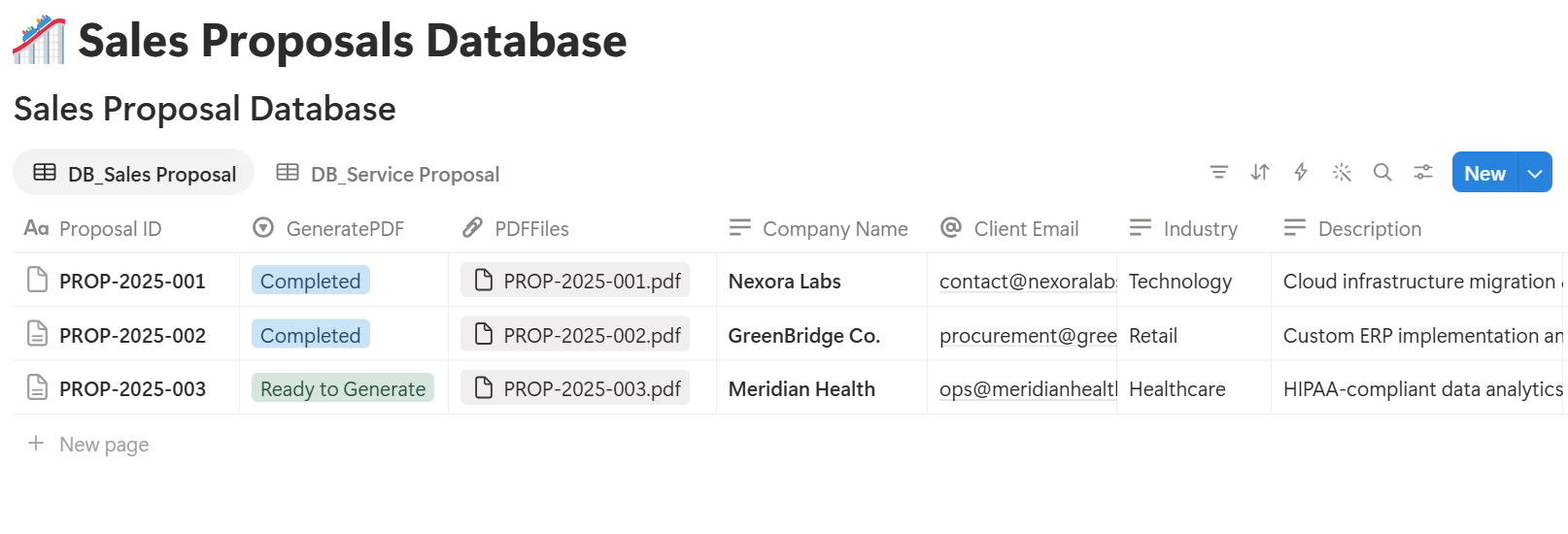
Start with Preview on a sample proposal. Look for blank fields, wrong date formats, and long text that runs past its box.
Key Takeaway: A proposal template saves you from rewriting the same structure each time, so you can spend your effort on the part that wins the work: understanding the client's problem.
Mistakes That Cost You the Job
Frequently Asked Questions
Can I make a proposal template in Notion?
Yes. Build a database for proposals, create a database template with sections for the summary, scope, timeline, pricing, and terms, and export each proposal as a PDF.
What’s the difference between a proposal and a quote?
A quote lists what something costs. A proposal explains the problem, your approach, the timeline, and the price. Use a quote for clear, repeatable jobs and a proposal when you have to make the case.
Should I send a Notion link or a PDF?
A PDF is safer. It looks the same on every device and can’t be edited after you send it, which also gives you a record of what the client agreed to.
Can clients sign a Notion proposal?
Notion doesn’t offer signatures on its own. You can send a PDF to an e-signature tool, or use a tool that supports it. PDFOutput lists a Generate E-Signed Doc option in its status settings.
How do I add an expiry date to a proposal?
Add a Date Sent property and a formula property that adds a set number of days, such as dateAdd(prop("Date Sent"), 14, "days"). Show that date on the proposal.
How long should a proposal be?
As long as it needs to be, and no longer. Many strong proposals run two to four pages. A short, clear one usually beats a long one that buries the price.
Related Reading
Conclusion
A good Notion proposal template gives you a consistent structure, honest pricing, and a clear way to track every proposal until it closes. Write the client’s problem first, test the totals, and send a PDF instead of a link. When proposals become a regular task, PDFOutput can fill your template from each Notion record and save the PDF back to your chosen storage.
Want your Notion proposals to look as good as the work behind them? Try PDFOutput.