Guides
How to Use Relation and Rollup in Notion
A complete guide to understanding Relation and Rollup properties in Notion — learn how to connect databases, pull data across them, and avoid common mistakes with practical business examples.
By Sanat Biswal · 2026-08-02 · 10 min read

If you have ever used a VLOOKUP in Excel, you will find the use of Relation and Rollups exactly similar to the same concept.
In Notion, Relation and Rollups can cause confusion especially for a beginner. How to setup relation and rollups, what is the use of relation and rollups are some of the most commonly asked questions for a user.
Today we are going to cover up all such commonly asked questions and understand the use of relation and rollups especially from the perspective of a business application.
Let's get started….
Related Reading — How to use Notion for business
What is Relation Property in Notion?
Simply put a relation property in a Notion Database helps to connect information between 2 different databases, much alike how VLOOKUP can help look for a value from any sheet onto another sheet in Excel (if you know how Excel works).
Why do we use Relation in the first place?
Notion doesn't allow natively any other way to connect 2 different databases other than using a relation property between the 2 databases.
Information usually stays scattered across different databases and becomes harder to put into one place.
Example of Relation and Rollup in Notion
Let's understand the use of Relation and Rollup from an example.
Let's say you have an Invoices Database which has the following details:
Along with this let's say we also have a Clients Database which has the following details:
Now for every invoice that will be created, we will need the corresponding details of the client as well.
How do we do that?
For this we will need to add a relation property in the Invoices Database which will help setup a connection between Client and Invoices.
Once the relationship is established between both the databases, only then we can fetch the details of the Clients onto the Invoices Database.
Related Reading : How to generate Invoices on automation in Notion
How to setup Relation property in Notion (Step by step guide)
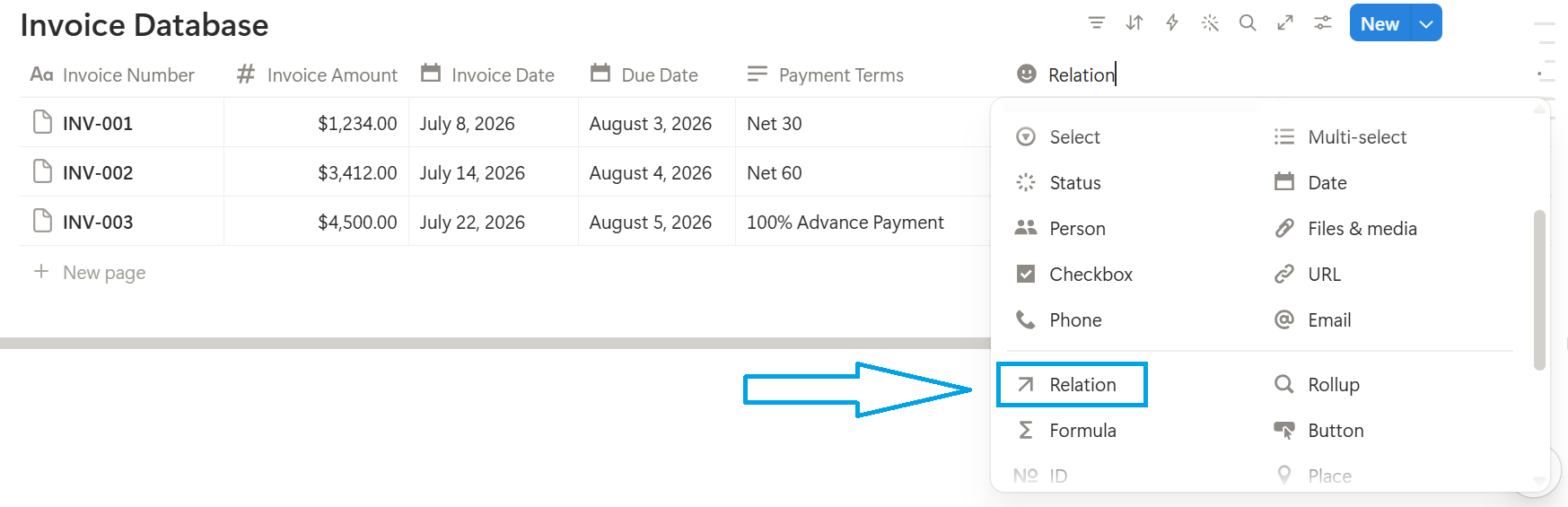
Follow the steps mentioned below to create a relation property in Invoices Database:
1. Create an Invoice Database with the desired properties
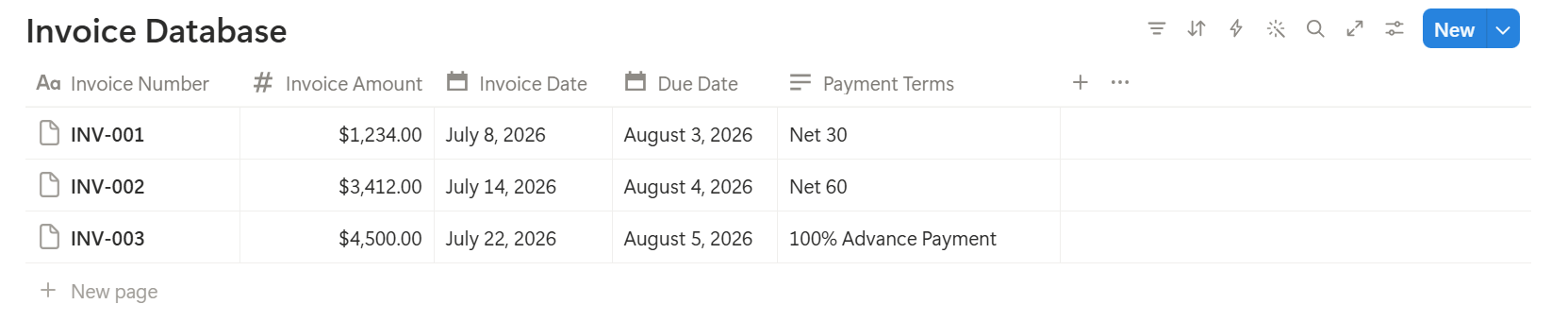
2. Click the "+" icon at the end of your column headers to add a new property.
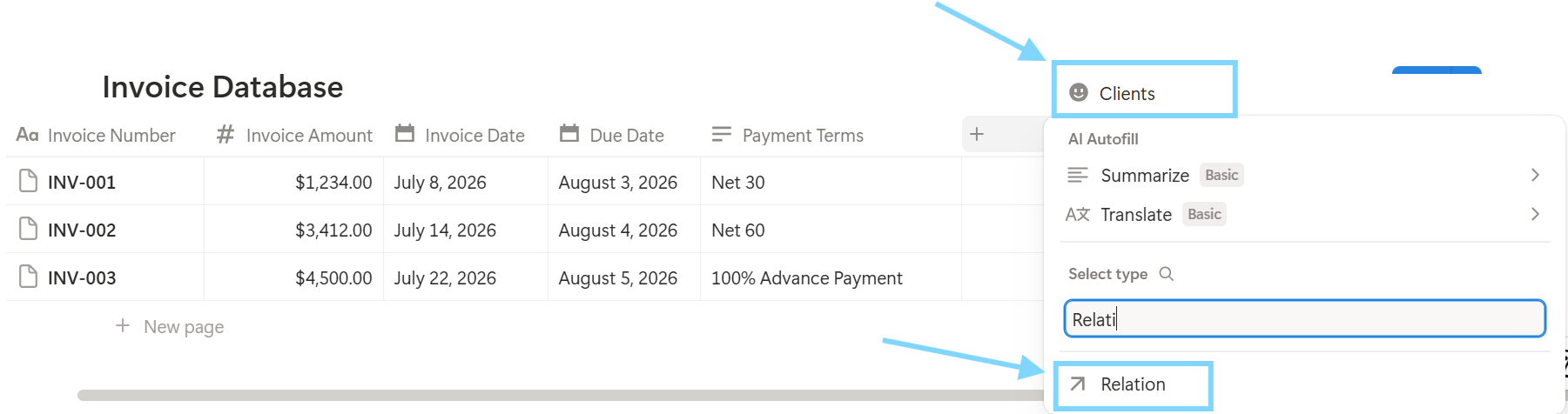
3. Select Relation as the property type and name the new property as "Clients".
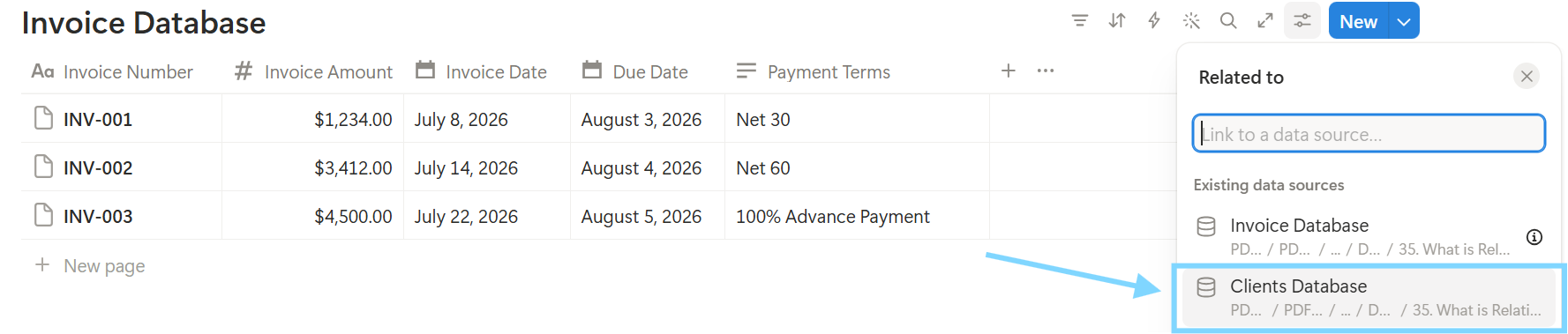
4. Link it to the Client Database to create a relation property with the Client Database.
5. Enable Two-way relation, define the property name as Invoice Database and click on Add relation to add a relation property.
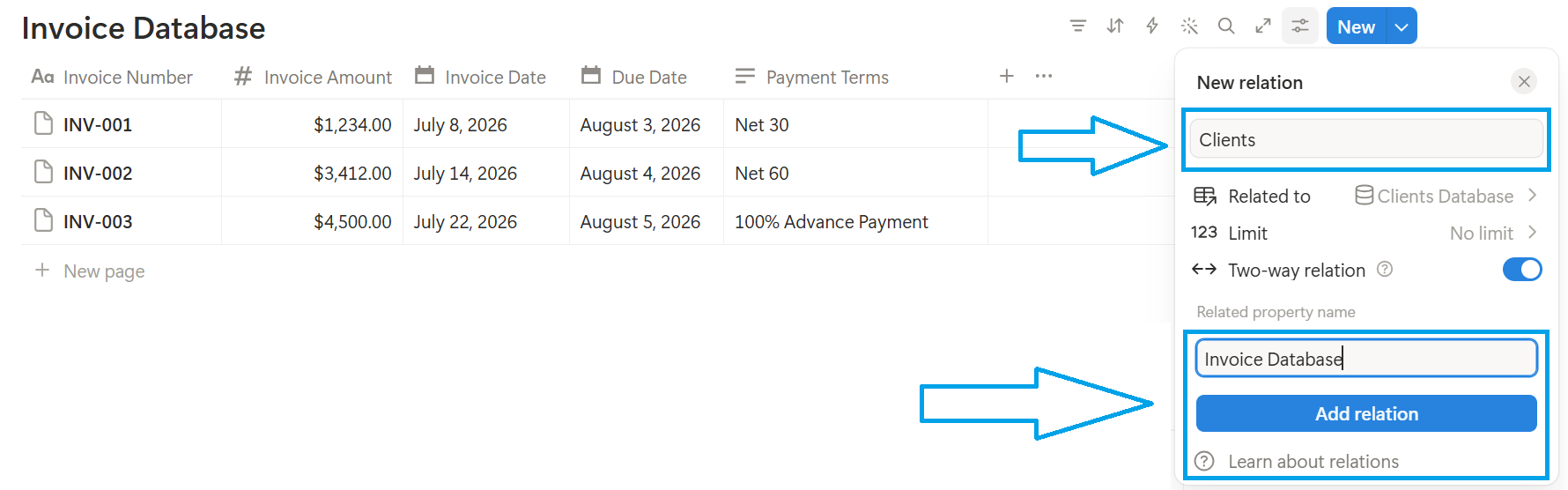
6. Once a relation is established, add the relation properties of the clients onto the Invoices Database.
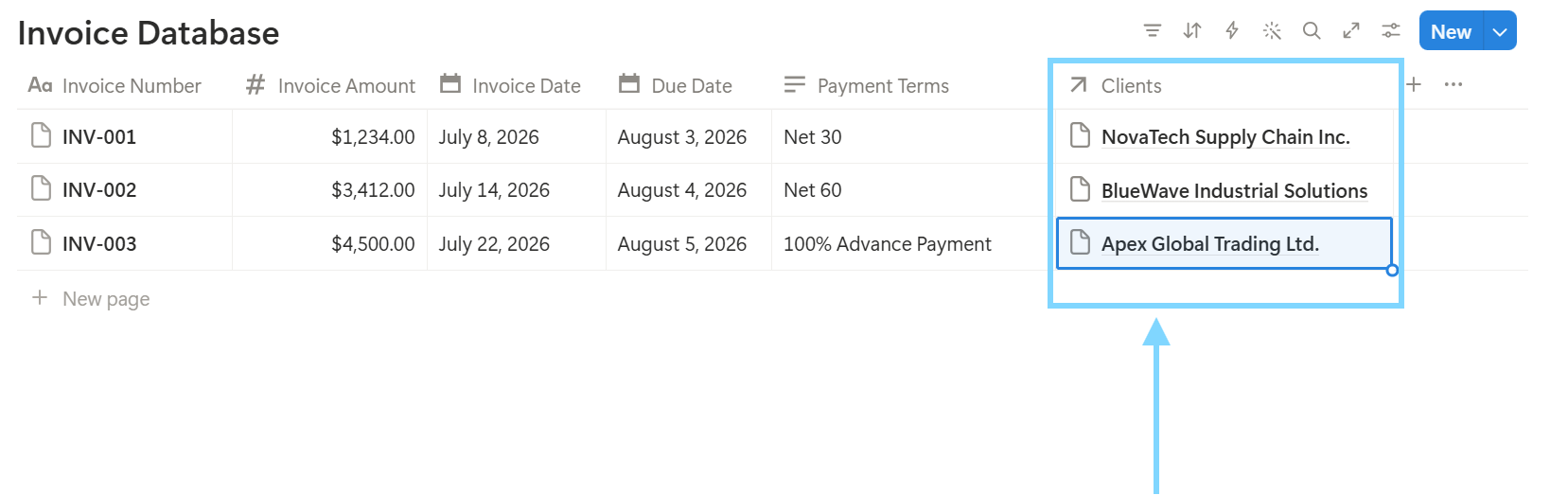
7. We can fetch all the relevant records of the Client Database onto the Invoices Database.
What is Rollup Property in Notion
A relation property establishes a relation between 2 different databases (i.e. Invoices and Clients in this example). A rollup property helps to pull in the desired properties from the secondary database onto the primary database.
This means if we want to show the Client Name, Client Address, Contact Information etc against each Invoice, we need to use Rollup property over here which can rollup the relevant details from the Client Database onto the Invoice Database for each Invoice.
Let's understand how this will work here…
How to setup Rollup Property in Notion (step by step guide)
Follow the steps mentioned below to create a rollup property in Invoices Database:
1. Open the Invoice Database.
2. Click the "+" icon at the end of your column headers to add a new property.
3. Name the property as "Client Address" and select it as Rollup property type.
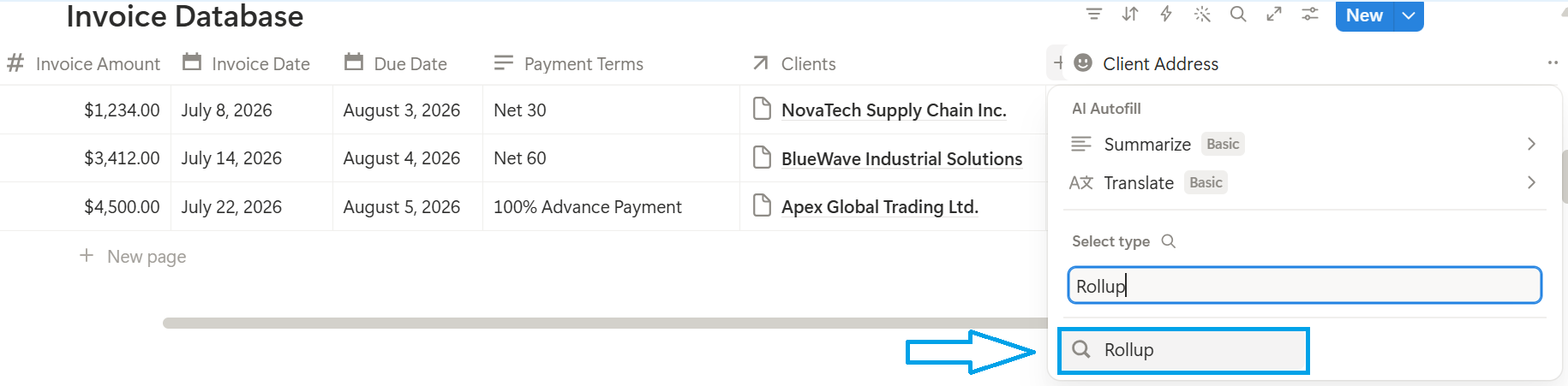
4. Select the property name as Client Address, select the Clients property as the Relation property and choose Client Address as the property to use in here.
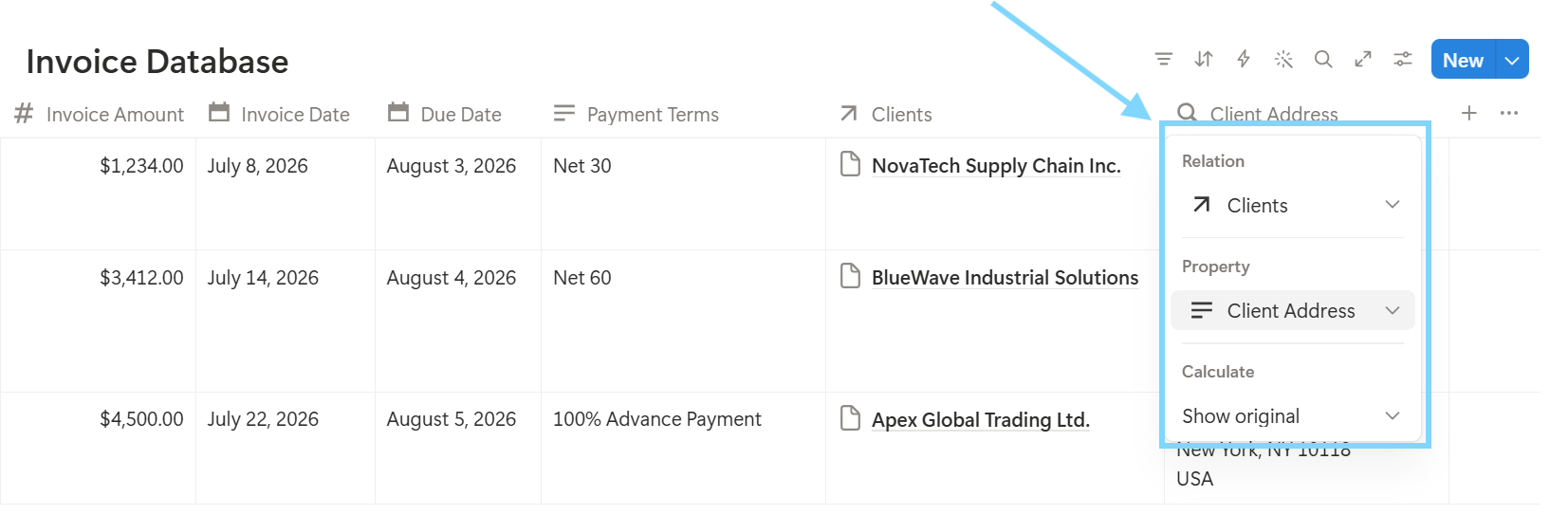
5. This helps us fetch the Client Address onto the Invoices Database as required.
6. On a similar note, we can rollup other properties as required from the Client Database as well such as Website Details, Contact Information etc.
This demonstrates how a Rollup can be used to fetch a property of the connected database pulled into the primary database.
Difference between Relation and Rollup in Notion
Here's key differences between Relation and Rollup in Notion:
| Description | Relation | Rollup |
|---|---|---|
| Purpose | Connects 2 or more databases creating link between each of the databases used. (eg: Client Database linked with the Invoice Database) | Displays the data from the related record being pulled. (eg: Client Address details pulled from the Client Database onto the Invoice Database) |
| Function | Establishes a relationship between different databases being used (e.g., linking a Client to multiple Projects). | Aggregates or summarizes related data (e.g., total project cost, count of projects, latest due date). |
| Dependency | Property can exist independently and serves as the foundation for linking the databases being used. | Property can't exist without a Relation property because it relies on linked database records to retrieve data. |
Practical Examples of How to Use Relation and Rollups in Notion
Relation and Rollup can have various use cases while using Notion.
Here's few prominent use cases of how to use Relation and Rollups in different scenarios:
- CRM Database is Linked to the Projects Database:
- Content Calendar Database is Linked to the Campaigns Database:
- Tasks Database is Linked to the Teams Directory Database:
Links each client information with their associated projects being assigned to, allowing the project information to be viewed from the client's record.
Example: A company is linked to 3 different projects and using a rollup shows a total project budget cost of around $120,000.
This connects content details linking it to the marketing campaign. This makes it easy for the users to track their marketing campaign progress in one central dashboard.
Example: For the next Summer Sale campaign that has 10 different linked posts, with a rollup value showing 80% posts published.
Example: Sarah Johnson has 15 different tasks setup against her name, using a rollup property helps to display 12 completed tasks and 3 pending tasks remaining.
Common Mistakes to Avoid While Using Relation and Rollups
Here's some of the common beginner mistakes that a user does when setting up Relation and Rollups on their workspace:
1. Users forget to enable two-way relations in the databases where the relation property is enabled.
When setting up a relation and rollup property, users generally forget to enable two-way relation connecting both the databases. Enabling this will allow seeing the relation property changes across both the databases to be used.
2. Choosing the incorrect rollup calculation type for the rollup properties used.
Rollup properties allows calculation type in several formats, such as:
Selecting an incorrect calculation type from the available options wouldn't give the desired result as expected.
Example: If a client wants to find the sum of Budget of all the Projects allocated, then choosing Sum will give the Rollup of Sum of all the project values linked to that client.
Let's say for Client A, there are 3 projects allocated which are $1,500, $1,800, $2,300 — selecting Sum for all these projects would give $5,600 whereas if Show Original Values is selected it will show the 3 original values, i.e. $1,500, $1,800 and $2,300 respectively.
3. Setting up Relation for many databases which can clutter the setup unnecessarily.
If the user sets up relation across many databases used together, it can cause clutter and chaos in the setup which won't help in the long run. So it's always advisable and recommended to use the databases up to the limit as recommended to keep the entire setup optimal and clean for reference.
Conclusion
Using a relation and rollup is a true power and gift for any Notion user, but using it effectively requires proper understanding on how to setup the entire database being used at one place.
I would encourage trying out this setup on one database first and then implementing the same onto multiple databases in use to setup the perfect relation and rollup for all databases connected.