Guides
How to Use Notion for a Veterinary Clinic: Scheduling, Stock, and Client Reminders
Set up Notion for a veterinary clinic: room schedules, stock, cold-chain logs, equipment, lab samples, and reminder templates, plus PDF service records and orders.
By Sanat Biswal · 2026-10-21 · 5 min read

{/ synced-from-notion — do not edit manually /}
A veterinary clinic runs on routines.
The vaccine fridge has to stay in range. The anaesthetic machine has to be checked before the first surgery. A blood sample is overdue back from the lab, and an owner is waiting for a call about their dog.
Most of this isn’t clinical work. It’s the machinery that lets clinical work happen, and it usually lives on whiteboards, sticky notes, and one practice manager’s memory.
Notion can hold that machinery in one place.
This guide is for veterinary clinics of any size. It shows how to set up room schedules, stock, equipment, lab samples, client reminder templates, and routine logs, and how to turn records into PDFs such as service records and supply orders.
It also explains what should stay out of Notion.
All of this is general information on organizing a practice, but not to be considered a legal, veterinary, or any form of compliance advice.
Quick answer on how to use Notion for a Veterinary Clinic:
To use Notion for a veterinary clinic, start with building linked databases for Daily Schedule Summaries, Stock, Equipment, Lab Samples, Reminder Campaigns, Routine Logs, and Staff Training.
Use formulas to work out room use and no-show rates from counts, flag stock that is expiring, flag equipment that is due for service, flag lab samples that are late, and flag fridge readings that are out of range.
Keep client contact details, patient records, images, prescriptions, and controlled drug registers in a system built and approved for them.
When you need to give someone a document, such as a service record or a supply order, create a PDF from the record.
Detailed answer on how to use Notion for veterinary clinic: Notion works well as the operations workspace for a veterinary clinic.
Each stock item, piece of equipment, lab sample, and log entry is a record, and the records are linked, so an autoclave shows its service history and a supplier shows its orders.
Notion isn’t a practice management system, a patient record, an imaging tool, or a billing tool.
Whether any client or patient information can be stored in it depends on the laws where you work, your agreements with the provider, and your own policies, and the safest design is to keep identifying details out.
For documents that suppliers, labs, engineers, and inspectors receive, you can export a page as a PDF or generate one from a template.
Table of Contents
What Notion Can and Can’t Do for a Veterinary Clinic
Notion is good for:
- Planning consult room and theatre use, and watching no-show rates.
- Tracking stock, expiry dates, and reorders.
- Recording equipment service dates and checks.
- Following external lab samples from sent to result received.
- Keeping routine checklists, including fridge temperature checks.
- Managing the wording and results of reminder campaigns.
- Storing procedures, policies, and training records.
- Creating consistent service records and supply orders.
- Patient records, clinical notes, or treatment plans.
- X-rays, ultrasound, and other images.
- Prescriptions and medication records.
- Controlled drug registers.
- Billing and insurance claims.
- Sending reminders to owners.
- Daily Schedule Summaries stores counts, not clients. Add these properties: Date, Room (Consult 1, Consult 2, Theatre, or Other), Slots Available, Slots Booked, Attended, No-shows, and Emergency Adds.
- Stock stores everything you hold. Add: Item, Category (Vaccine, Medicine, Anaesthetic, Consumable, Diet, or Other), Supplier (relation), In Stock, Reorder Level, Batch Number, Expiry Date, Storage Location, and Needs Fridge (checkbox).
- Equipment stores each piece of kit. Add: Name, Type (Autoclave, Anaesthetic Machine, X-ray Unit, Dental Scaler, Lab Analyser, Monitor, or Other), Serial Number, Location, Last Service, Service Interval (months), Warranty End, and Service Contact.
- Lab Samples stores work sent out. Add: Sample ID, Lab (relation), Type (Blood, Urine, Cytology, Histology, or Other), Urgent (checkbox), Sent On, Expected Back, Received On, and Status (Sent, In Progress, Result Received, or Problem).
- Reminder Campaigns stores the reminder programmes you run. Add: Campaign (Vaccination Due, Flea and Worm, Dental Check, Post-op Check, or Senior Health Check), Message Wording, Send Rule, Channel (SMS, Email, or Phone), Owner of Campaign, Last Reviewed, Sent This Month, and Booked After.
- Routine Logs stores checks and checklists. Add: Date, Routine (Opening, Closing, Weekly, Monthly, or Fridge Check), Completed By, Completed (checkbox), Min Temp, Max Temp, and Notes.
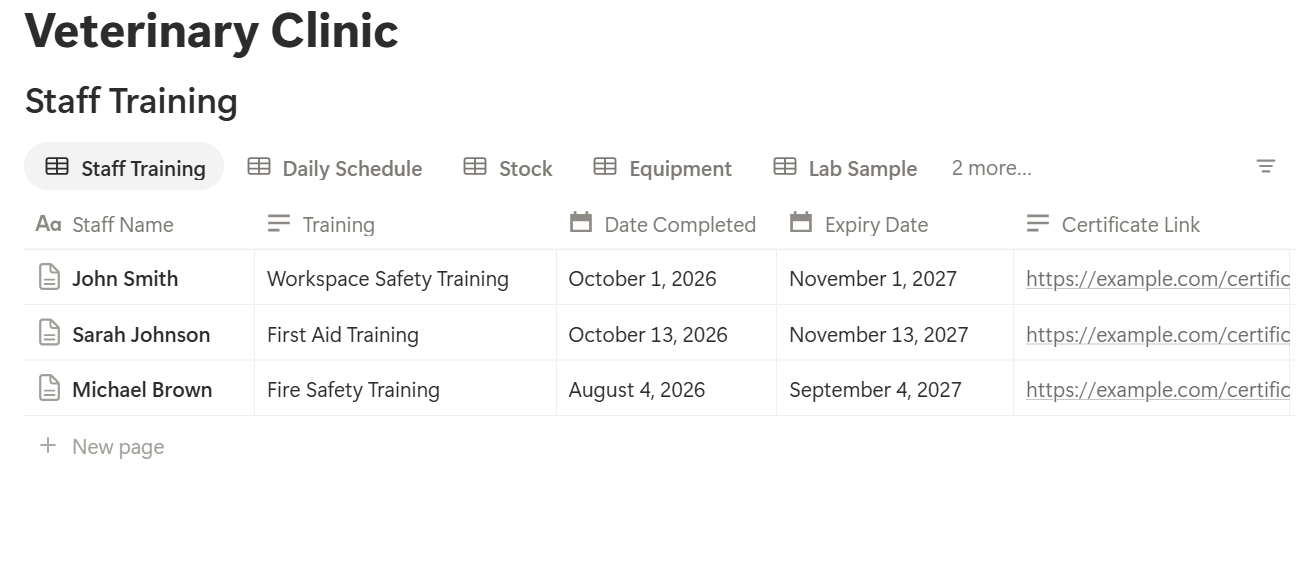
- Staff Training stores dates. Add: Person, Training, Date Completed, Expiry Date, and Certificate Link.
- Opening checklist: equipment powered up and checked, consult rooms and theatre set up, supplies in place, kennels and wards checked, and any alerts from the day before reviewed
- Closing checklist: equipment shut down, waste handled, surfaces cleaned, inpatients handed over, and the day’s counts entered
- Weekly checks: the things you check once a week
- Monthly checks: the things you check once a month
- Fridge check: the minimum and maximum temperature since the last check, and who recorded them
- Today’s routines: logs for today, so the person opening the clinic sees what to complete.
- Missed routines: logs from earlier days where Completed isn’t ticked, for the practice manager.
- Fridge problems: fridge checks that are out of range.
- This month: all logs for the month, for review.
- Reorder list: stock with the Reorder flag, grouped by supplier.
- Check dates: stock with the expiry flag, sorted by date.
- Fridge stock: items where Needs Fridge is ticked, so cold-chain stock is easy to check.
- By storage location: stock grouped by cabinet or room, so stock checks are quick.
- Service due: equipment with a service flag, sorted by date.
- By type: equipment grouped by type.
- Warranty ending: equipment with the warranty flag.
- Repairs this year: the Service Log filtered to this year, with a sum of costs, to see what each piece of kit really costs to keep running.
- Open samples: samples not yet Result Received, sorted by expected date.
- Late or due soon: samples with a flag.
- Urgent: open samples where Urgent is ticked.
- By lab: samples grouped by lab, to see who is reliable.
- Campaigns by booking rate: to see what works.
- Wording to review: campaigns with the review flag.
- By owner of campaign: so each programme has a person responsible.
- Equipment service records: the history of one piece of equipment, for an engineer, an auditor, or an inspector
- Supply orders: a clean order sheet for each supplier
- Lab sample lists: open samples for a lab, by Sample ID and expected date, with clinical details kept in your practice system
- Staff rotas: a printable weekly schedule, including on-call cover
- Training records: a list of certificates and expiry dates
- Policy and procedure documents: copies for staff, with a sign-off page
- Routine and fridge check summaries: a monthly record of completed checks, as a working summary beside the official logs
- Reminder campaign reports: sent counts and booking rates by campaign
- Monthly operations reports: room use, no-show rates, and costs, for the owner or accountant. Notion to Excel helps if your accountant wants the numbers in a spreadsheet.
- Create your template with your clinic’s name and layout.
- Add placeholders in double curly braces where the data should go, such as
{{Equipment_Name}}or{{Last_Service}}. - Make sure each placeholder matches the name of a Notion property.
- Start the document with a Notion database button or a status property.
- Ready to Generate creates a PDF from the database record.
- Generate Page converts the Notion page into a PDF.
- Generate PDF and Doc creates a PDF and a Google document.
- Preview creates a Google document so you can check it before making the final PDF.
- Generate E-Signed Doc creates an e-signed PDF in the database workflow.
- Give nurses and reception access to routines, stock, reminder campaigns, and the schedule summaries, not to staff pay or contracts.
- Keep staff training, registration details, and rota notes limited to the practice manager and owner.
- Give an outside engineer only a finished PDF of the service record, and not workspace access.
- Don’t share the workspace with suppliers, labs, or clients.
- Write down your rules about what may and may not be stored in Notion, and make sure every new team member, including locums, reads them.
- Remove access on the day someone leaves.
- Review who has access every few months.
- How to Use Notion for a Dental Clinic
- How to Use Notion for a Healthcare Clinic
- How to Use Notion for a Salon or Spa
- How to Export a Notion Database to PDF
Notion is not made for:
If you already use a practice management system, treat Notion as the operations layer beside it.
It’s the clinic’s back room, and not the patient’s file.
Client and Patient Data: Draw the Line First
A pet’s record is tied to an owner’s name, phone number, and address, and the rules about personal data are strict in many places.
Before you build anything, decide what will never go into Notion.
| Usually a good fit | Usually a poor fit |
|---|---|
| Counts of appointments, attendance, and no-shows | Owner names with appointment details |
| Stock levels, batch numbers, and expiry dates | Clinical notes, diagnoses, and treatment plans |
| Equipment service history | X-rays, photos, and scans |
| Lab sample IDs and due dates | Prescriptions and medication records |
| Reminder wording and campaign counts | Owner phone numbers, emails, and addresses |
| Staff rotas and training dates | Controlled drug registers |
| Procedures and policies | Anything that identifies an owner together with their animal’s condition |
Examples include GDPR in the European Union and various privacy laws in the United States, among many others.
Veterinary regulators may also set rules for records and for controlled drugs. Check which rules apply to your clinic, and ask a compliance professional if you’re not sure. If you can’t get a clear yes for a type of data, keep it out of Notion.
A simple design rule keeps most clinics safe: use IDs, not names.
A lab sample is “Sample 2087”, and the link to the animal and owner lives in your practice system. An appointment summary is a count, and not a list of people.
While you are testing, use made-up data only.
Use These 7 Databases
Start with these 7 databases. You can add more later.
A relation connects a record in one database to a record in another.
Link Stock to a Suppliers database, Lab Samples to a Labs database, and add a Service Log database linked to Equipment. Now an equipment page shows its full service history in one place.
Every Day: Room Schedules Without Client Names
You don’t need owner or pet names to understand how busy your rooms are. Counts are enough, and counts are far safer.
At the end of each day, the front desk adds one summary record per room, copied from the practice system: slots available, slots booked, patients attended, no-shows, and emergency adds. Then add two formulas:
*Room use: if(prop("Slots Available") > 0, prop("Attended") / prop("Slots Available"), 0) No-show rate: if(prop("Slots Booked") > 0, prop("No-shows") / prop("Slots Booked"), 0)*
Format both as percents. Here is a made-up day for two consult rooms with sixteen slots each. Counts are for the day.
| Item | Count |
|---|---|
| Slots available (2 rooms x 16) | 32 |
| Slots booked | 28 |
| Attended | 25 |
| No-shows | 3 |
| Room use | 78% |
| No-show rate | 10.7% |
If Emergency Adds is high on certain days, you may want to leave slots open. Those insights help you plan staffing and booking rules, without a single owner name in the database.
Group the summaries by weekday in a table view, with an average under each percent column, and you can see the pattern in a minute. Test the formulas with made-up numbers and check them with a calculator.
> 💡 Pro Tip: Enter the counts the same time every day, such as at closing. A habit beats a perfect system you forget to use.
Every Day: Opening, Closing, and Cold-Chain Checks
Routine checks are easy to skip when the day is busy, and hard to explain when someone asks about them later.
Make database templates for the routines you do, with a short checklist for each:
Each day, someone clicks New and gets the same list. They tick the items, add their name, and write a note if something was wrong. Keep each list short, because a long checklist gets ticked without being checked.
The vaccine fridge deserves its own routine. Vaccines and some other products must be kept within a set range, commonly 2°C to 8°C, but follow the manufacturer’s instructions for each product. Add a formula to Routine Logs:
Fridge status: if(prop("Min Temp") >= 2 and prop("Max Temp") <= 8, "In range", "Out of range")
Make a view of fridge checks where the status is Out of range, so the practice manager sees problems at once. Write down in your policy what happens next, such as who is told and how affected stock is handled.
Infection control routines, sterilizer cycles, and controlled drug checks are governed by your regulator, your equipment manufacturer’s instructions, and your own protocols.
Use the official format and frequency they require, and treat your Notion checklist as a working copy and a reminder. Don’t use it to replace a required log or register unless you’ve checked that it meets the rules.
Make views of Routine Logs:
Stock: Expiry Dates and Reordering
Out-of-date vaccines and medicines are a risk, and running out in the middle of a consult is a bad day. Formulas watch both for you.
On Stock, add:
*Days to expiry: dateBetween(prop("Expiry Date"), now(), "days") Expiry flag: if(prop("Days to expiry") < 0, "Expired", if(prop("Days to expiry") <= 60, "Expiring soon", "")) Reorder flag: if(prop("In Stock") <= prop("Reorder Level"), "Reorder", "")*
The flags show Expiring soon within 60 days of expiry, and Reorder when stock is at or below the reorder level. Change the 60 days to match how fast you use each item.
Vaccines you use slowly may need a longer window. Expired items should be removed from use and handled as your protocols require.
Make these views:
Record the batch number and expiry date when stock arrives. Some products need extra care with dates, storage, and opened-vial use, so follow the manufacturer’s instructions.
Keep any record that links a batch to a patient in your patient system, as your rules require, and not in Notion.
Controlled drugs are a special case. The register, the balance checks, and the storage rules are set by your regulator. Keep the official register in the format required, and use Notion only for a reminder that the checks are due.
A weekly stock check takes ten minutes. Update In Stock as part of it, because the flags are only as good as the counts.
Equipment: Service, Checks, and Records
An autoclave, an anaesthetic machine, and an X-ray unit are the heart of the clinic. A breakdown costs a day or more, and a missed inspection can cost more than that.
On Equipment, add:
*Next Service: dateAdd(prop("Last Service"), prop("Service Interval"), "months") Service flag: if(dateBetween(prop("Next Service"), now(), "days") < 0, "Service overdue", if(dateBetween(prop("Next Service"), now(), "days") <= 30, "Service soon", ""))*
The flag shows Service soon 30 days before the next service date, and Service overdue after it. Set the interval from the manufacturer’s guidance and your regulator’s requirements.
Some equipment, such as X-ray units and anaesthetic machines, may need inspections and tests by qualified people at set intervals under the rules where you work, so check what applies to you.
Add a Service Log database linked to Equipment, with the date, what was done, who did it, the cost, and a link to the report or certificate.
After each visit, update Last Service on the equipment record. Add a warranty end date, and a flag for it:
Warranty flag: if(dateBetween(prop("Warranty End"), now(), "days") <= 60 and dateBetween(prop("Warranty End"), now(), "days") >= 0, "Warranty ending", "")
A warranty that expires next month is the best time to ask for a check.
Make these views:
If a piece of equipment fails, a short Fault report template with the date, what happened, what you did, and who you called keeps the story straight. Check where incident records must be kept under your rules.
Lab Samples: Never Lose a Result
Samples travel. A blood sample goes out, a result comes back, and someone has to act on it, often with an owner waiting. A result that sits unread in an inbox is a worse outcome than a late one.
Track each sample by its Sample ID, which is a number from your practice system, and not by the animal’s or owner’s name. On Lab Samples, add:
*Days to due: dateBetween(prop("Expected Back"), now(), "days") Lab flag: if(prop("Status") != "Result Received" and prop("Days to due") < 0, "Overdue", if(prop("Status") != "Result Received" and prop("Days to due") <= 1, "Due soon", ""))*
The flag shows Due soon within one day of the expected date, and Overdue after it. Check it each morning. If a sample is overdue, call the lab before the owner calls you. For urgent samples, tick the Urgent checkbox and make a view that shows them first.
Make these views:
When a result arrives, mark it Received and make sure the right vet sees it in your practice system. A rollup of late samples by lab over a few months tells you which lab to keep. The request form and the result itself, with the clinical details, belong in your practice system. A Notion record only needs the ID, the type, and the dates.
Client Reminders: Templates and Results Without Contact Details
Reminders bring animals back for vaccines, dental checks, and follow-ups. They are also personal data, because each one goes to a named owner about a named pet. So the line is clear: your practice system sends the reminders, and Notion manages the programme around them.
On Reminder Campaigns, each record is one programme, such as “Vaccination Due” or “Post-op Check”. Store the message wording, the send rule (for example, four weeks before the due date), the channel, who owns the campaign, and the date the wording was last reviewed. At the end of each month, copy two counts from the practice system: how many reminders were sent, and how many bookings followed. Then add:
*Booking rate: if(prop("Sent This Month") > 0, prop("Booked After") / prop("Sent This Month"), 0) Review flag: if(dateBetween(now(), prop("Last Reviewed"), "days") > 180, "Review wording", "")*
For example, if 120 vaccination reminders were sent and 30 bookings followed, the booking rate is 25%. Compare campaigns and months.
A campaign with a low booking rate may need clearer wording, a different channel, or a different send time. The review flag shows when wording hasn’t been checked for six months, so a reminder doesn’t keep quoting an old price or opening hour.
Add a Message Templates page or database for the wording you reuse, such as a vaccination reminder, a missed appointment message, a post-op check call script, and a lab result call script. Write them with placeholders like [Pet name] and [Date], and keep real names out. Staff copy the template into the practice system and fill in the details there.
Make these views:
Check the rules that apply to you on consent and marketing messages. Reminders about a pet’s health and promotional messages are not always treated the same way.
Your Team: Rotas, On-Call, and Training Dates
Veterinary teams hold a lot of dates that matter: registrations, certificates, and training that expires.
On Staff Training, add:
*Days to expiry: dateBetween(prop("Expiry Date"), now(), "days") Training flag: if(prop("Days to expiry") < 0, "Expired", if(prop("Days to expiry") <= 90, "Renew soon", ""))*
A view of training with a flag, sorted by date, gives the practice manager one list to work through each month. Keep certificate files in a secure place and link to them. Professional registration numbers and personal details are sensitive, so store only what you need.
For the rota, use a Shifts database with person, date, start and end times, and room or role, shown as a calendar view. Add an On-Call type for out-of-hours cover. Put leave and training days on the same calendar, so clashes are visible before they cause a gap.
A Day at a Two-Room Clinic
To see how the pieces fit, here is one made-up day.
7:45 am. The practice manager opens the home page. The Today’s routines view shows the opening checklist, and a fridge check is waiting. The Lab flags show one sample due back today and one overdue.
8:00 am. She calls the lab about the overdue sample, and gets a new time. She notes it on the record and tells the vet. The owner can be called well before they call in.
8:15 am. The fridge reading is logged: minimum 3°C, maximum 7°C. The status shows In range.
9:30 am. A nurse notices the flea treatment shelf is nearly empty. She updates the stock count, and the Reorder flag appears.
12:30 pm. The Equipment view shows the anaesthetic machine with a Service soon flag. The manager books the engineer for next week, and adds a note to the record.
3:00 pm. A delivery arrives. The nurse enters batch numbers and expiry dates for the new stock, and the Expiring soon flag clears on an item that has been replaced.
5:30 pm. At closing, the front desk enters the day’s counts. Room use is 78%, and the no-show rate is 10.7%.
6:00 pm. The closing checklist is ticked. The manager creates the supplier order from the Reorder list, and sends it as a PDF.
No owner or pet names were needed anywhere.
The Documents That Leave Notion
Suppliers, labs, engineers, and inspectors don’t use your workspace, so some records need to become files. These all avoid owner and patient information:
For a single page, you can use Notion’s export option. How to Export Notion to PDF shows the settings, and How to Export a Notion Database to PDF helps with tables, such as a rota.
Suppliers and inspectors notice how organized your records look, and Notion’s own export gives you limited control over layout. How to Add Your Logo and Brand Colors to Notion PDFs explains how a template solves that.
Generating PDFs with PDFOutput
PDFOutput creates documents from your Notion data using a template. A template can be a Google document, a Word file, a PDF file, or a Notion page. If you already have an order or record layout in Word or Google Docs, you can reuse it.
Here is how it works:
These are some of the status options:
The e-signed option may help with policy acknowledgements. Whether an electronic signature is valid for a given document depends on your location, so check before you rely on it.
You can save the finished file to a property in your database, so a service record stays on its equipment page. You can also save it to a Google Drive folder and store the link in a property.
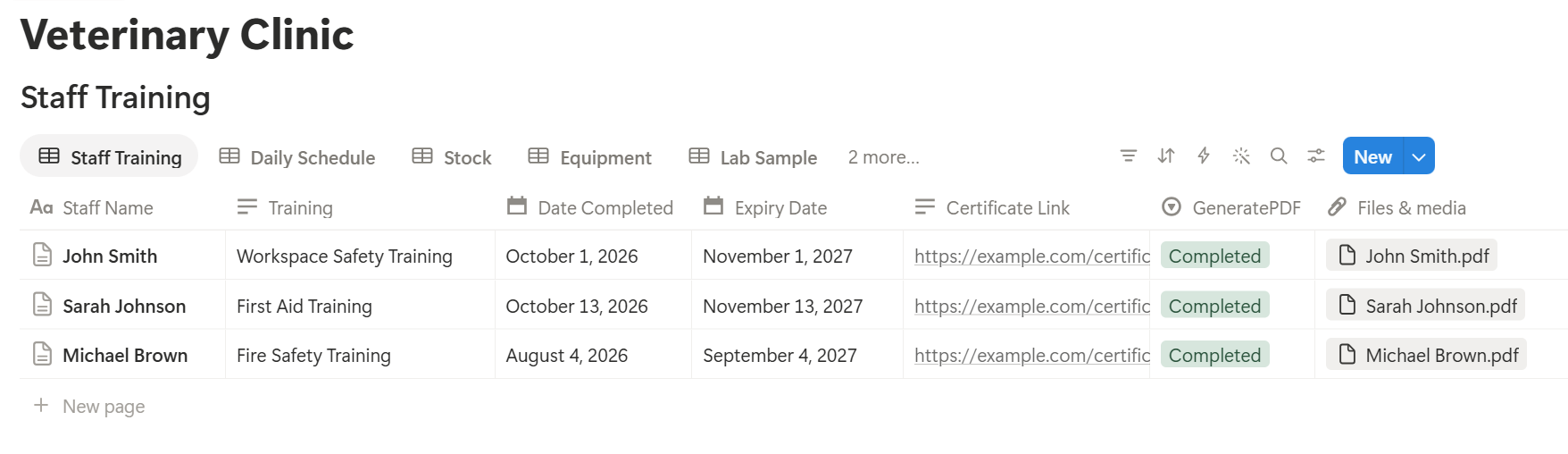
An equipment service record lists many entries, and a supply order lists many items, each stored as its own linked record. Before you rely on a template to list them all, test it with a sample record that has several, and check that each appears the way you want. If it doesn’t, a simple fallback is to keep a short text summary on the record, and use that in the template.
Before using any document tool with information about people or animals, ask the provider how data is handled, where it’s stored, and what agreements are available, and keep the answers with your compliance records. The safest approach is to generate documents only from records that contain no owner or patient information, as in this guide.
Start with the equipment service record or the supply order. Use Preview first and check for empty fields, wrong date formats, and details that don’t match your records.
> 📌 Key Takeaway: Use Notion for what runs the clinic, and your practice system for what you know about owners and patients. Counts, IDs, dates, and checklists give you most of the time savings with a fraction of the risk.
Who Can See What
Even without client data, a clinic workspace holds information worth protecting, such as supplier terms, staff details, and security routines.
Common Mistakes
Letting owner or pet names creep in. It starts with “Bella’s bloods” in a note. Use sample IDs, and remind people regularly.
Putting contact details in reminder records. The practice system sends reminders. Notion holds the wording and the counts.
Treating Notion as the official log. If your regulator requires a set format for sterilization, controlled drugs, or other logs, keep that record, and use Notion as the reminder.
Letting stock counts go stale. Flags only help if In Stock and expiry dates are updated when stock arrives.
Ignoring the fridge. A cold-chain failure can spoil a whole shelf of stock. Log the readings, and decide in advance what to do when one is out of range.
Long checklists. People tick boxes without checking. Fewer items, done properly, beat a long list.
Skipping service dates because the kit still works. Missed services cause the breakdowns that close a theatre for a day.
Not recording who did what. A tick without a name can’t answer a question later.
No owner for the structure. Pick one person responsible for the setup. Properties get renamed and formulas break, so tell that person not to rename properties used in PDF templates, because the placeholders must match exactly.
Skipping a test. Run a week with made-up data first, and fix what annoys the team before you use real records.
Frequently Asked Questions
Can Notion be used for a veterinary clinic?
Yes, for operations such as stock, equipment service, lab sample tracking, routine checklists, reminder campaign management, and staff training dates. It isn’t a practice management system or a patient record, so keep owner and patient information in a system built and approved for it.
Can I store client or patient information in Notion?
Only after you’ve confirmed that the laws, agreements, and settings that apply to you allow it. If you can’t get a clear answer, keep that information out of Notion, and use IDs and counts instead of names.
Can Notion send reminders to pet owners?
Notion is not built to send reminders to clients, and owner contact details should stay in your practice system. Use Notion to keep the reminder wording, the send rules, and the monthly results, and send the reminders from your practice system.
How do I track room use without client names?
Create a Daily Schedule Summaries database with counts of slots available, booked, attended, and no-shows for each room. Add formulas that divide the counts to give room use and the no-show rate.
How do I track vaccine fridge temperatures in Notion?
Add a Fridge Check routine to your Routine Logs with minimum and maximum temperature fields, and a formula that shows In range or Out of range. Use the range given by the manufacturer of your products, and keep any record your regulator requires in its official format.
How do I track equipment service in Notion?
Create an Equipment database with a last service date and a service interval, then add a formula that calculates the next service date and flags anything overdue. Link a Service Log to each piece of equipment.
Can I create service records and supply orders from Notion?
You can export a page as a PDF, or use a template-based tool such as PDFOutput to fill a record or order template with data from each record. Test it on a few sample records first, and use records that contain no owner or patient information.
Related Reading
Conclusion
The best Notion setup for a veterinary clinic is a quiet back room: stock that warns you before it expires, a fridge that tells you when it drifts, equipment that tells you when it needs service, lab samples you never lose track of, and reminder campaigns you can measure. Settle the client data question first, use IDs and counts, and test with made-up data before you use real records. When your service records, supply orders, and rotas need to leave Notion, PDFOutput can fill your template from each record and save the PDF to your chosen storage.
Want clean service records and supply orders straight from Notion? Try PDFOutput.