Guides
How to Use Notion for a SaaS Startup: Roadmaps, Customers, and Releases
Learn how to set up Notion for a SaaS startup with a roadmap, customer feedback, releases, and metrics, plus PDF release notes, customer reviews, and investor updates.
By Sanat Biswal · 2026-10-19 · 5 min read

{/ synced-from-notion — do not edit manually /}
A software startup runs on a loop.
Customers say what they need. The team decides what to build. Something is shipped. Customers react. Then it starts again. In a small team, that loop often lives in a chat app, a spreadsheet of “feature requests,” and the founder’s head.
Then someone asks why a feature was built, or which customers asked for it, and nobody can say.
Notion can hold that loop in one place. This guide is for early-stage SaaS teams of roughly 2 to 30 people. It shows how to set up feedback, a roadmap, releases, customer records, and metrics, and how to turn records into PDFs such as release notes, customer review reports, and investor updates.
It is general information about organizing a business, not legal or financial advice.
To use Notion for a SaaS startup, create linked databases for Customers, Feedback, Roadmap Items, Releases, and Monthly Metrics.
Use a formula to score roadmap ideas, rollups to show how many customers asked for each one, and views for planning, shipping, and renewals.
Keep code, bugs, and deployments in the tools built for them. When you need to share something outside the team, such as release notes or an investor update, create a PDF from the record.
Notion works well for a startup as the place where decisions, feedback, and plans live. Each customer, piece of feedback, roadmap item, and release is a record, and the records are linked, so a roadmap item shows which customers asked for it and which release shipped it.
Notion isn’t a code host, a bug tracker connected to your repositories, or an analytics tool. It works best beside those, which hold the engineering and usage data. For documents that people outside the team receive, you can export a page as a PDF or generate one from a template.
Table of Contents
What Notion Can and Can’t Do for a SaaS Team
Notion is good for:
- Collecting customer feedback in one place.
- Scoring and ranking roadmap ideas.
- Showing which customers asked for which feature.
- Planning releases and writing release notes.
- Tracking customer renewals and account notes.
- Writing specs, decisions, and onboarding docs.
- Preparing monthly metrics and investor updates.
- Hosting code or running deployments.
- Error monitoring and logging.
- Product analytics and usage tracking.
- Billing and subscription management.
- Handling support tickets at volume.
- Never store passwords, API keys, tokens, or private keys in Notion. Use a password manager or a secrets tool.
- Be careful with customer data. Notes about an account are fine. Exports of user lists, personal data, or database dumps don’t belong in a planning workspace.
- Check your contracts. Customer agreements and security questionnaires may promise where data is kept and who can see it.
- Don’t make claims about security you can’t back up. If a customer asks about your security, answer from your real policies and certifications, and not from a Notion page you wrote in a hurry.
- Customers stores your accounts. Add these properties: Company, Plan (Free, Starter, Pro, or Enterprise), MRR (monthly recurring revenue), Start Date, Renewal Date, Owner (who looks after them), Health (Green, Amber, or Red), and Notes.
- Feedback stores what customers say. Add: Summary, Customer (relation), Source (Email, Call, Chat, or Survey), Type (Request, Problem, or Praise), Date, Roadmap Item (relation), and a rollup that brings in the customer’s MRR.
- Roadmap Items stores what you might build. Add: Item, Problem It Solves, Status (Idea, Planned, In Progress, Shipped, or Not Doing), Reach, Impact, Confidence, Effort, Score, Owner, and Target Release (relation).
- Releases stores what you ship. Add: Version, Release Date, Status (Planned or Released), Summary, Roadmap Items (relation), and Notes for Customers.
- Monthly Metrics stores the numbers you report. Add: Month, Starting MRR, New MRR, Expansion MRR, Churned MRR, Net New MRR (a formula), Ending MRR (a formula), Active Customers, and Notes.
- A quick capture template with only the summary, the customer, and the type.
- A Notion form that anyone on the team can use from a phone, so a sales call can add feedback in thirty seconds. Check what your plan allows.
- A weekly feedback review where someone links each new item to a roadmap item, or creates one.
- New this week: Feedback with no roadmap item yet.
- By customer: Feedback grouped by customer, for account reviews.
- Problems from big accounts: Feedback of type Problem, sorted by the customer’s MRR.
- Reach: how many customers it affects in a period
- Impact: how much it helps each one (for example 1 to 3)
- Confidence: how sure you are, as a percentage
- Effort: how much work it is, in weeks or days
- Roadmap board: Roadmap Items grouped by Status.
- Ranked ideas: Items with the status Idea, sorted by Score.
- Now, next, later: a board grouped by a simple Horizon property, for sharing a high-level plan.
- What shipped: Items with the status Shipped, grouped by release.
- Summary: one or two sentences on what changed and why
- What’s new: a short list in plain words
- Fixes: a short list
- Notes for customers: anything they need to do, such as updating a setting
- Internal checklist: tests passed, docs updated, support told, release notes published
- Renewals coming: Customers with the Renewal soon flag, sorted by date.
- At risk: Customers with Health set to Amber or Red, sorted by MRR.
- Top accounts: Customers sorted by MRR, for regular check-ins.
- Release notes: a clean PDF for customers who track changes
- Customer review reports: what a customer uses, what you shipped for them, and what’s next
- Investor updates: monthly metrics, highlights, and asks. Notion to Google Docs covers moving content into an editable file if investors want to comment.
- Proposals and order forms: for sales. Notion Proposal Template shows a structure that works.
- Statements of work for larger deals
- Onboarding guides for new customers
- Technical specs and decision records: for your own team or partners. Notion to Markdown helps if developers want docs in a repository.
- Policy documents for customer reviews, written from your real policies and checked by someone responsible for them
- Create your template with your logo and layout.
- Add placeholders in double curly braces where the data should go, such as
{{Version}}or{{Company}}. - Make sure each placeholder matches the name of a Notion property.
- Start the document with a Notion database button or a status property.
- Ready to Generate creates a PDF from the database record.
- Generate Page converts the Notion page into a PDF.
- Generate PDF and Doc creates a PDF and a Google document.
- Preview creates a Google document so you can check it before making the final PDF.
- Generate E-Signed Doc creates an e-signed PDF in the database workflow.
- Keep MRR, ARR, and renewal details out of views that everyone can open, if your team doesn’t need them.
- Give contractors and advisors access only to the pages they work on.
- Keep investor materials in a separate, restricted area.
- Don’t give customers access to your workspace. Send them a finished PDF or a public release notes page.
- Never store secrets, keys, or passwords.
- Remove access on the day someone leaves.
- Review who has access every few months.
- How to Use Notion for Consultants
- Notion Proposal Template
- Notion to Markdown
- Notion to Google Docs
Notion is not made for:
If you already use an issue tracker, a support desk, or a billing system, treat Notion as the planning and decision layer beside them.
Link to the engineering work, and don’t try to copy it.
Keep Secrets and Customer Data Safe
A software company holds things that must never leak.
Privacy and security rules differ by country and by customer, so check what applies to you. While you are testing, use made-up customers.
Use 5 Databases
Start with these five. You can add more later.
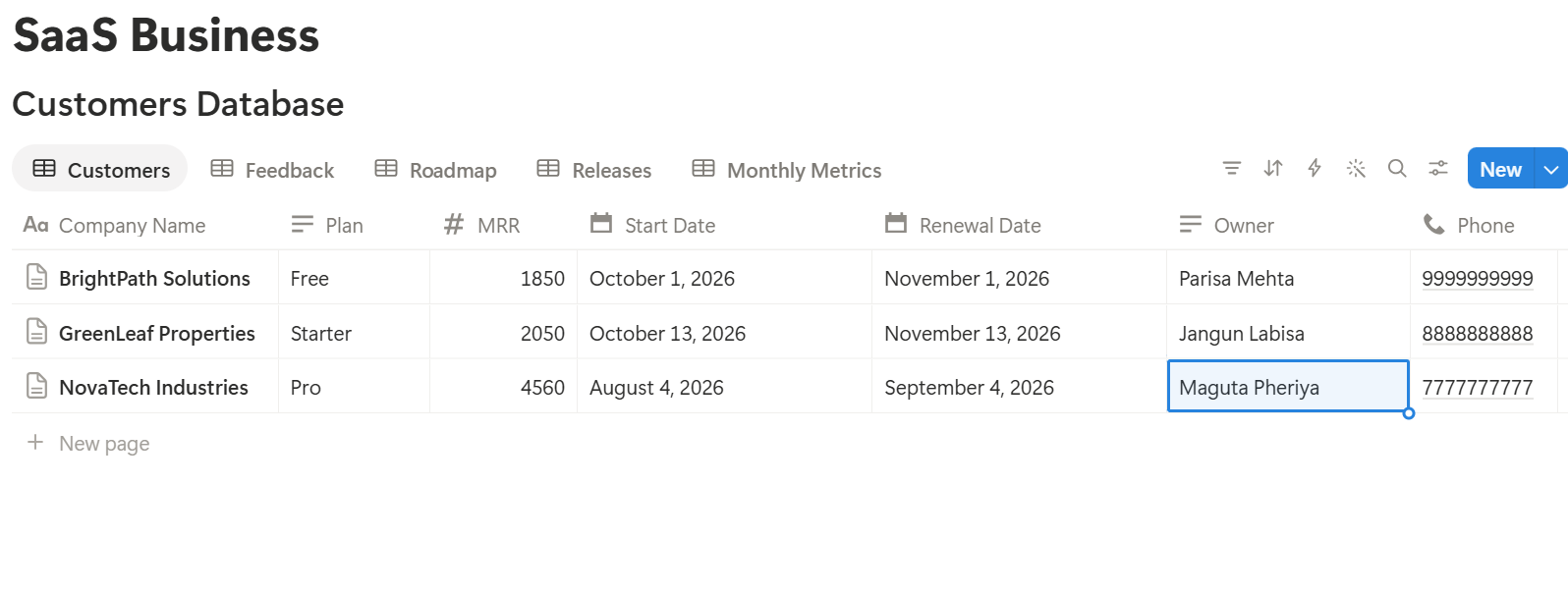
A relation connects a record in one database to a record in another. Link Feedback to Customers and Roadmap Items, and link Roadmap Items to Releases. Now a roadmap item shows who asked for it, and a release shows what it contains.
Feedback: Capture It Once
Feedback gets lost because it arrives everywhere: calls, emails, chats, and conversations in the hallway. The rule is simple. If a customer said it, it goes in the Feedback database once, in a sentence or two.
Make this easy:
Write what the customer said and what problem they were trying to solve, rather than the solution they suggested. “I can’t tell which of my team has used the report” is more useful than “add a column.” Customers are experts in their problems, and you are the expert on the solutions.
Views to make:
Roadmap: Decide What to Build
A roadmap isn’t a promise. It’s a record of what you think matters most, and why.
Scoring Ideas
Give each roadmap item four numbers:
Then add one formula:
Score: if(prop("Effort") > 0, prop("Reach") prop("Impact") prop("Confidence") / prop("Effort"), 0)
Format Confidence as a percent. Here are three made-up ideas, with confidence as a decimal:
| Idea | Reach | Impact | Confidence | Effort (weeks) | Score |
|---|---|---|---|---|---|
| CSV export | 40 | 2 | 0.8 | 2 | 32 |
| Team permissions | 25 | 3 | 0.7 | 5 | 10.5 |
| Dark mode | 60 | 1 | 0.9 | 1 | 54 |
Who Asked For It?
On Roadmap Items, add two rollups from Feedback: one that counts the pieces of feedback, and one that sums the customers’ MRR. Name them Requests and Requesting MRR. If a customer gave the same feedback twice, they’re counted twice, so merge duplicates or treat the number as a rough guide.
Now each roadmap item shows how many times it was requested and how much revenue stands behind those requests. When someone says “everyone wants this,” you can check.
Views
Pro Tip: Add a "Why we said no" note to every item you reject. It stops the same idea from coming back every month, and it helps the next person on the team understand your thinking.
Releases: Ship and Tell People
A release isn’t finished when the code is deployed. It’s finished when the right people know about it.
Create a release record before you ship, and link it to the roadmap items it includes. Use a Release template with these sections:
When it ships, change the status to Released, and set each linked roadmap item to Shipped. Then tell the customers who asked for it. Open the roadmap item, look at its linked feedback, and send a short, personal note to each of those customers. It’s one of the cheapest ways to build loyalty, and Notion makes the list in a few seconds.
For public release notes, a simple Notion page or your own help center works. For customers who want a file, such as enterprise customers who track changes, send a PDF. The documents section below explains how.
Customers: Renewals and Health
Churn is quiet. Customers rarely announce that they’re leaving. They just stop using the product, and then they don’t renew.
On Customers, add these formulas:
*Days to renewal: dateBetween(prop("Renewal Date"), now(), "days") Renewal flag: if(prop("Days to renewal") < 0, "Overdue", if(prop("Days to renewal") <= 60, "Renewal soon", "")) ARR: prop("MRR") 12
The flag shows Renewal soon 60 days before the renewal date, so you have time for a real conversation. ARR (annual recurring revenue) is just MRR times twelve.
Add a Health property, and update it after each conversation. Green means things are going well. Amber means something is worrying you. Red means the account may leave. Keep the rule simple, and write one line on why. If you have usage data in another tool, check it before deciding.
Make three views:
A Quarterly review template for each major customer helps. It lists what they use, what they asked for, what you shipped for them, and what you’ll do next. The result is the kind of document a customer is glad to receive.
Metrics: The Monthly Number That Matters
Investors, advisors, and your own team all want to know one thing: is it growing? A small Monthly Metrics database answers that every month.
On Monthly Metrics, add two formulas:
*Net New MRR: prop("New MRR") + prop("Expansion MRR") - prop("Churned MRR") Ending MRR: prop("Starting MRR") + prop("Net New MRR")*
And one more for growth:
Growth: if(prop("Starting MRR") > 0, prop("Net New MRR") / prop("Starting MRR"), 0)
Here is a made-up month. Amounts are in your own currency.
| Item | Amount |
|---|---|
| Starting MRR | 40,000 |
| New MRR | 4,000 |
| Expansion MRR | 800 |
| Churned MRR | 1,200 |
| Net new MRR | 3,600 |
| Ending MRR | 43,600 |
| Growth | 9% |
A Week at a Five-Person Startup
To see how the loop works, here is one made-up week.
Monday. The founder opens the feedback review. Nine new items arrived last week. She links six to existing roadmap items and creates two new ones. One item, a bulk upload feature, now shows seven requests from customers worth a combined 6,400 MRR.
Tuesday. The team reviews Ranked ideas. Bulk upload scores high, and it has revenue behind it. They move it to Planned and assign an owner.
Wednesday. An engineer ships a small release. She opens the release record, ticks the checklist, and marks two roadmap items as Shipped.
Thursday. The customer success lead opens the shipped item, sees the five customers who asked for it, and sends each a short note. One replies within the hour, delighted.
Friday. The Renewals coming view shows a customer renewing in 52 days with Amber health. The founder schedules a call, and checks what that customer asked for and what has shipped for them.
End of the month. She fills in the monthly metrics and writes the investor update in about twenty minutes, because the numbers and the story are already in Notion.
The Documents That Leave Notion
People outside the team don’t use your workspace, so some records need to become files:
For a single page, you can use Notion’s export option. How to Export Notion to PDF shows the settings. Customers and investors notice how your documents look, and Notion’s own export gives you limited control over layout. How to Add Your Logo and Brand Colors to Notion PDFs explains how a template solves that.
Generating PDFs with PDFOutput
PDFOutput creates documents from your Notion data using a template. A template can be a Google document, a Word file, a PDF file, or a Notion page. If you already have a report or update layout in Google Docs or Word, you can reuse it.
Here is how it works:
These are some of the status options:
The e-signed option may help with order forms and statements of work. Whether an electronic signature is valid for a given agreement depends on your location and the type of contract, so check before you rely on it. You can save the finished file to a property in your database, so release notes stay on their release record. You can also save it to a Google Drive folder and store the link in a property.
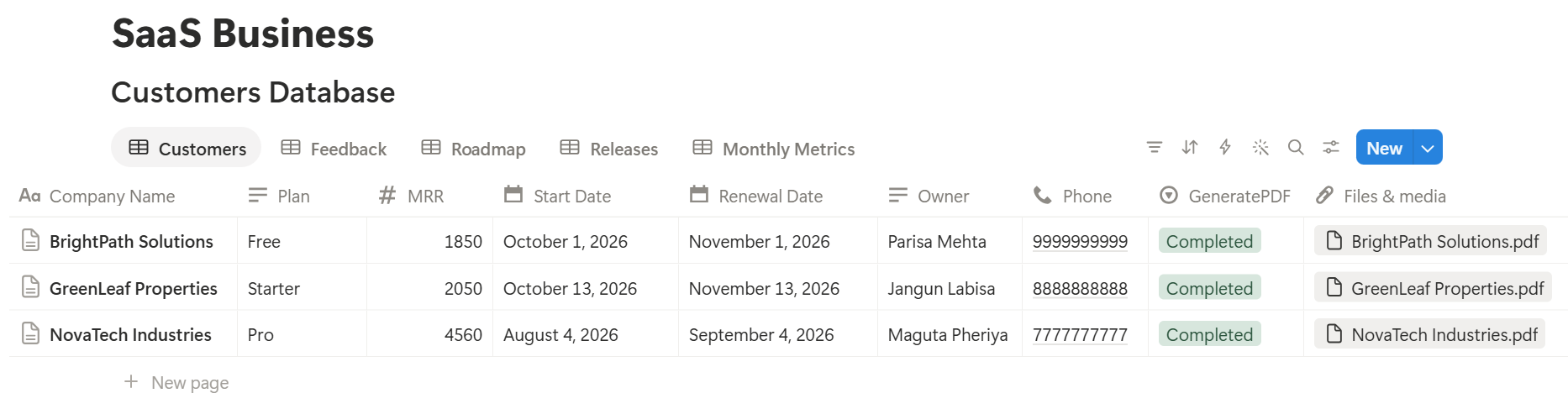
A release links to several roadmap items, and a customer review links to several pieces of feedback. Before you rely on a template to list every linked item, test it with a sample record that has several, and check that each one appears the way you want. If it doesn’t, a simple fallback is a short text property, such as “What’s new,” which you fill in for each release.
Start with the investor update or release notes, whichever you send more often. Use Preview first and check for empty fields, wrong number formats, and text that doesn’t fit.
Key Takeaway: Capture feedback once, link it to the roadmap, and tell customers when you ship. If that loop runs smoothly, the roadmap, the release notes, and the investor update all come from records you already have.
Who Can See What
Your workspace will hold customer details, revenue, and strategy, so control access from the start.
Common Mistakes
Copying the issue tracker into Notion. You’ll end up with two lists that disagree. Link to the engineering work, and keep the decisions in Notion.
Treating the score as the answer. A formula helps you compare ideas. It doesn’t know about strategy or timing.
Feedback with no customer attached. “Someone asked for this” can’t be followed up. Always record who.
Not closing the loop. Customers who asked for a feature and never heard it shipped feel ignored. Send the note.
Changing the definition of MRR. If you change your method, say so, and don’t compare numbers from different methods.
Too many properties. If a form takes two minutes to fill in, nobody will use it. Keep capture short.
No owner for the structure. Pick one person responsible for the setup. Properties get renamed and formulas break, so tell that person not to rename properties used in PDF templates, because the placeholders must match exactly.
Skipping a test. Run one pretend month through the setup first, and fix what annoys the team before you use real data.
Frequently Asked Questions
Can Notion be used for a SaaS startup?
Yes. It can organize customer feedback, a prioritized roadmap, releases, customer accounts, and monthly metrics. It doesn’t host code, monitor errors, track product usage, or manage billing, so use dedicated tools for those.
How do I build a product roadmap in Notion?
Create a Roadmap Items database with a status, a score, and a link to feedback and releases. Make a board view grouped by status, and a table view of ideas sorted by score.
How do I prioritize features in Notion?
Add Reach, Impact, Confidence, and Effort properties, and a formula that multiplies the first three and divides by effort. Treat the score as an input to your decision, and not as the decision itself.
How do I track customer feedback in Notion?
Create a Feedback database linked to customers and roadmap items. Capture each piece of feedback once, with the customer and the problem they described. Review new items weekly.
Can Notion write release notes?
You can write them on a Notion page, then export the page as a PDF, or use a template-based tool such as PDFOutput to fill a release notes template with data from each release record. Test it on a few sample records first.
Should I use Notion or an issue tracker for engineering work?
Use an issue tracker for tickets, code links, and sprints. Use Notion for feedback, decisions, specs, and the roadmap, and link the two.
Is it safe to store customer information in Notion?
Notion lets you control who sees each page, but your duties depend on your contracts and the rules where you work. Keep account notes, not raw user data, and never store passwords or keys.
Related Reading
Conclusion
A good SaaS setup in Notion keeps one loop running: feedback goes in, ideas get scored, releases ship, and customers hear about it. Start with feedback and the roadmap, add releases and customers when those work, and run one pretend month through the system before you trust it. When your release notes, customer reviews, and investor updates need to leave Notion, PDFOutput can fill your template from each record and save the PDF to your chosen storage.
Want release notes and investor updates as clean PDFs? Try PDFOutput.