Guides
How to Use Notion for Property Management: Tenants, Leases, and Maintenance
Learn how to set up Notion for property management with tenants, leases, rent tracking, and maintenance, plus PDF receipts, statements, and work orders.
By Sanat Biswal · 2026-10-18 · 5 min read

{/ synced-from-notion — do not edit manually /}
Property management is mostly about remembering things end to end.
Some of the typical scenarios includes when does the lease end? Who paid rent the for this month, and who paid in half for this month?
Which tenant has reported for the leaking tap, and did the plumber ever come?
When all of this lives in a spreadsheet, a notebook, and in the text messages, something always is often missed out, and it usually costs money to the business to fix loose ends.
Notion can help to bring these records together. The following guide is for landlords with few units in possession and small property managers.
It shows how to set up properties, tenants, leases, rent, and maintenance, and how to turn records into PDFs such as rent receipts, statements, and work orders.
The following advices and recommendations are to be considered as general business advice, but not to be construed as legal advice, and the tenancy rules differ a lot from place to place.
How can notion be used for property management?
To use Notion for property management, create linked databases for Properties, Units, Tenants, Leases, Rent Payments, Maintenance Requests, and Vendors.
Use formulas to flag leases that are ending, rent that is late, and maintenance requests that have been open too long. Make views for each job.
When you need to give someone a document, such as a rent receipt, a statement, or a work order, create a PDF from the record.
Detailed Guide on how to Use Notion for Property Management:
Notion works well for landlords and small managers as a shared records and planning workspace. Each unit, tenant, lease, payment, and repair is a record, and the records are linked, so a unit page shows its current tenant, its lease dates, its rent history, and its repairs.
Notion isn’t rent collection software, a tenant screening service, or a legal tool. It doesn’t take payments, run background checks, or make sure your notices follow the law. It works best beside those tools. For documents that tenants, owners, and vendors receive, you can export a page as a PDF or generate one from a template.
Table of Contents
What Notion Can and Can’t Do for Property Management
Notion is good for:
- Keeping units, tenants, and leases in one place.
- Tracking what rent is due and what has been paid.
- Warning you before a lease ends.
- Logging maintenance requests and vendor work.
- Keeping checklists for move-in and move-out.
- Creating consistent receipts, statements, and work orders.
- Collecting rent online.
- Screening tenants or running credit checks.
- Giving legal notices that follow local law.
- Accounting for trust or deposit accounts.
- Contact details and emergency contacts are normal and expected.
- ID documents, income details, and references are sensitive. Many places have rules about how long you may keep them and how you must protect them, so check yours. Keep scans in a secure system built for documents, and link to them.
- Bank and card details should never be stored in Notion. Keep them with your bank or payment provider.
- Notes about a tenant should be fair, factual, and professional. Assume a tenant may someday be allowed to see them.
- Properties stores each building or address. Add these properties: Property Name, Address, Owner (if you manage for others), and Notes.
- Units stores each rentable unit. Add: Unit Number, Property (relation), Type (Studio, 1-Bed, 2-Bed, or Shop), Monthly Rent, Occupied (checkbox), and Notes.
- Tenants stores the people who rent. Add: Name, Phone, Email, Emergency Contact, and Notes.
- Leases stores each tenancy. Add: Unit (relation), Tenant (relation), Start Date, End Date, Monthly Rent, Deposit Amount, and Status (Active, Ending, or Ended).
- Rent Payments stores each month’s rent. Add: Lease (relation), Due Date, Amount Due, Amount Paid, Date Paid, and Status (Unpaid, Partial, or Paid).
- Maintenance Requests stores repairs. Add: Unit (relation), Issue, Priority (Low, Medium, or Urgent), Reported On, Status (New, Scheduled, In Progress, or Fixed), Vendor (relation), and Cost.
- Vendors stores your tradespeople. Add: Company, Trade (Plumber, Electrician, Cleaner, or Other), Phone, and Rating (your own score).
- a tenant record,
- a lease record, and
- a set of rent payments.
- Signed lease received (stored in your document system)
- Deposit received and recorded
- Keys handed over
- Move-in inspection done, with photos
- Meter readings recorded
- Contact details and emergency contact confirmed
- Rules and house information given to the tenant
- Late rent: Rent Payments with the Late flag, sorted by days late.
- This month’s rent roll: all payments due this month, grouped by property.
- Partial payments: Rent Payments with Status set to Partial.
- Monday. A tenant in unit 201 reports a leaking tap through the form. The request is logged as Medium priority, with a photo.
- Monday afternoon. You assign the request to a plumber from your Vendors list, and set the status to Scheduled.
- Wednesday. The plumber fixes it. You enter the cost, change the status to Fixed, and attach the invoice.
- Wednesday evening. The tenant gets a short message confirming the repair.
- Open requests: Maintenance Requests that aren’t Fixed, sorted by priority and age.
- Chase list: requests with the Chase flag.
- By vendor: Maintenance Requests grouped by vendor, to see who you use most.
- Costs this year: Maintenance Requests filtered to this year, grouped by property.
- Notice received, with the date
- Move-out inspection done, with photos
- Keys returned
- Meter readings recorded
- Damage compared with the move-in inspection
- Deposit decision made and documented
- Forwarding address recorded
- Unit status changed to vacant, and a cleaning or repair job created
- Rent receipts: proof of payment. Notion Receipt Template shows how to structure one.
- Rent statements: a tenant’s payments over a period
- Lease summaries: a one-page overview of key dates and amounts, alongside the signed lease
- Move-in and move-out inspection reports: condition notes and photos
- Maintenance work orders for vendors
- Owner statements: monthly income, costs, and balance for owners you manage for
- Renewal offers and notices: use wording reviewed by someone qualified, and follow your local rules for how notices must be given
- Welcome packs: house rules, contacts, and instructions
- Create your template with your logo and layout.
- Add placeholders in double curly braces where the data should go, such as
{{Tenant_Name}}or{{Amount_Paid}}. - Make sure each placeholder matches the name of a Notion property.
- Start the document with a Notion database button or a status property.
- Ready to Generate creates a PDF from the database record.
- Generate Page converts the Notion page into a PDF.
- Generate PDF and Doc creates a PDF and a Google document.
- Preview creates a Google document so you can check it before making the final PDF.
- Generate E-Signed Doc creates an e-signed PDF in the database workflow.
- Give a maintenance helper access to open requests and unit numbers, not to rent or tenant details.
- Keep rent amounts, deposits, and tenant notes out of views that others don’t need.
- Don’t give tenants or vendors access to your workspace. Send tenants a form link and finished PDFs, and send vendors a work order.
- If you manage for owners, share only their own properties with them, as a PDF statement.
- Remove access on the day someone leaves.
- Review who has access every few months.
- How to Use Notion for Real Estate
- How to Use Notion for a Construction Business
- How to Use Notion for a Hotel
- Notion Receipt Template
Notion is not made for:
If you already use rent collection or accounting software, treat Notion as the planning and records layer beside it. Let those tools take the payment, and use Notion to see the whole picture.
Protect Tenant Information
Tenants hand you a lot of sensitive information. Think about what you really need.
Privacy rules and tenancy laws differ by country, state, and city, so check yours before you add real data. While you are testing, use made-up tenants.
Use of the 7 Databases
It sounds like a lot, but each one is small. Start with the first 4 databases, and add the rest as you need them.
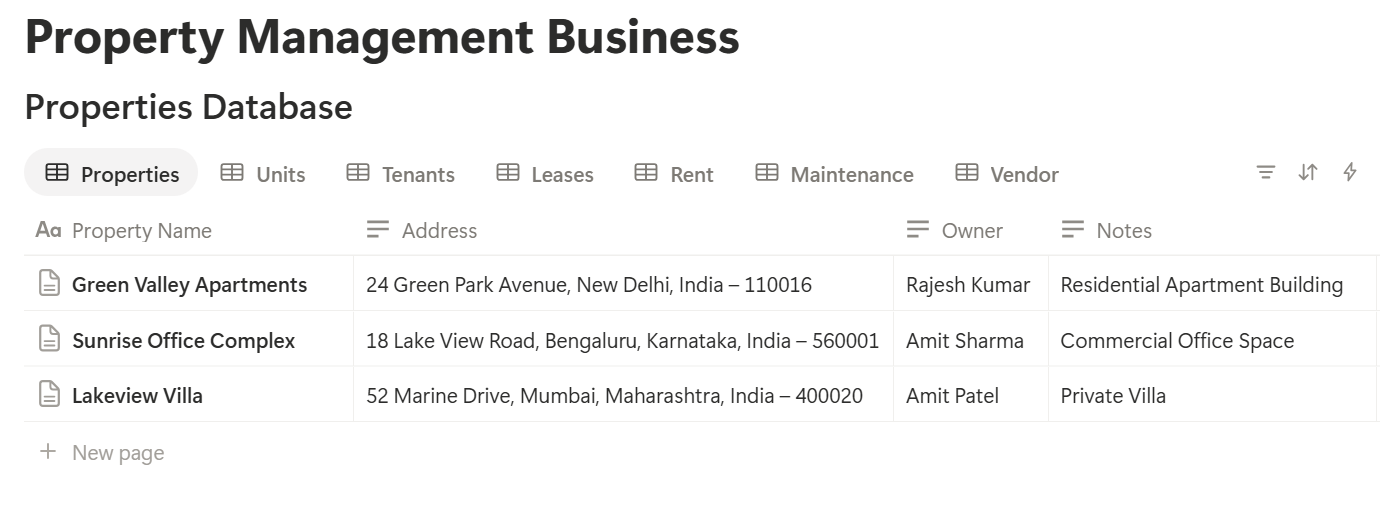
A relation connects a record in one database to a record in another.
Link Units to Properties, Leases to Units and Tenants, Rent Payments to Leases, and Maintenance Requests to Units and Vendors. Now a unit page shows its tenant, its lease, its payments, and its repairs together.
Move-In: Setting Up a Tenancy
When a new tenant moves in, you create 3 things:
Use a Move-in checklist template on the lease, with items such as:
Tick the Occupied box on the unit, and set the lease Status to Active. A rollup on each property that shows the percent of units occupied gives you an instant picture:
Occupancy: rollup of Units > Occupied > Percent checked
Use your own lease, written or checked by someone qualified in your area. Notion holds the facts about the lease, such as dates and amounts, but the legal document should be kept in its signed form.
Every Month: Tracking Rent
Tracking rent is the most important routine, so make it easy.
Formulas for Rent Payments
*Balance: prop("Amount Due") - prop("Amount Paid") Late flag: if(prop("Status") != "Paid" and prop("Due Date") < now(), "Late", "") Days late: if(prop("Late flag") == "Late", dateBetween(now(), prop("Due Date"), "days"), 0)*
Create next month’s payment records from a template at the start of each month, or add a Rent Payments record for every active lease. Some plans offer database automations that can help, so check what yours includes. Format amounts as currency.
The Rent Roll
A rent roll lists every unit, who lives in it, and what has been paid. Here is a made-up one for one month, with amounts in your own currency.
| Unit | Tenant | Rent due | Paid | Balance | Status |
|---|---|---|---|---|---|
| 101 | Tenant A | 900 | 900 | 0 | Paid |
| 102 | Tenant B | 900 | 450 | 450 | Partial |
| 201 | Tenant C | 1,050 | 0 | 1,050 | Late |
| 202 | Vacant | n/a | n/a | n/a | n/a |
| Total | 2,850 | 1,350 | 1,500 |
Views for Rent
Handle late rent according to your lease and local law. Notion can show you who is late. The steps you take next, such as fees or notices, must follow the rules where you are.
Pro Tip: Record each payment the day it arrives, with the date and the amount. Arguments about rent are much easier to settle when the record is dated and specific.
Leases: Never Miss a Renewal
A lease that quietly rolls over, or ends without a plan, can cost you a month of rent or a bad surprise. A few formulas keep you ahead.
On Leases, add:
*Days left: dateBetween(prop("End Date"), now(), "days") Renewal flag: if(prop("Status") == "Active" and prop("Days left") < 0, "Ended", if(prop("Status") == "Active" and prop("Days left") <= 90, "Renewal due", ""))*
The flag shows Renewal due 90 days before a lease ends. Many places have rules about how much notice you must give about rent changes or non-renewal, so set the number to give yourself time to follow them.
A Renewal Timeline
Here is a plan a landlord might follow for one lease. The timings are examples, and your local rules may require something different.
| When | What to do |
|---|---|
| 120 days before the end | Review the rent against the market and the unit’s condition |
| 90 days before the end | Renewal due flag appears. Decide whether to renew, change terms, or end |
| 75 days before the end | Contact the tenant, and send any notice your local rules require |
| 45 days before the end | Sign the renewal, or start looking for a new tenant |
| End date | New lease starts, or the move-out process begins |
Maintenance: From Request to Fixed
Maintenance is where tenants decide whether you are a good landlord. A fast, clear process matters more than a perfect one.
Taking Requests
Let tenants report problems through a simple route. A Notion form can add a request to your Maintenance Requests database, with the unit, the issue, a photo, and a contact number. The form adds a record without giving the tenant access to your workspace. Check what your plan allows and test the form on a phone.
Emergencies, such as a gas smell, flooding, or no heating in winter, shouldn’t wait for a form. Give tenants a phone number for urgent problems, and put it in your welcome pack.
Formulas for Maintenance
*Days open: if(prop("Status") != "Fixed", dateBetween(now(), prop("Reported On"), "days"), 0) Chase flag: if(prop("Status") != "Fixed" and prop("Days open") > 7, "Chase", "")*
The flag shows Chase for any open request older than seven days. Change the number to match your standards.
A Request From Start to Finish
Here is a made-up example.
The unit page now shows the repair and its cost. At the end of the year, a rollup on each unit that sums Cost shows what you spent. Over time, you’ll see which units, vendors, and problems cost the most.
Views for Maintenance
Move-Out: Inspections and Closing the File
When a tenant leaves, treat it as a mini project.
Use a Move-out checklist template with these items:
Rules about deposits, deductions, deadlines, and notices are strict in many places, and mistakes can be expensive. Follow your local law and your lease, and have someone qualified check your process. Notion keeps the record, but it doesn’t know the rules.
Set the lease Status to Ended, untick Occupied on the unit, and create the tasks to prepare it for the next tenant.
A Month With Eight Units
To see how the pieces fit, here is one made-up month for a small landlord with eight units across two buildings.
1st of the month. The landlord creates rent records for every active lease. The Rent roll view shows all eight, with the total due.
5th. Six tenants have paid. The Late rent view shows two. One has made a partial payment, which the landlord records.
8th. A message goes to the two tenants who haven’t paid, following the lease terms.
12th. The Renewals due view shows one lease ending in 85 days. The landlord reviews the rent and decides to offer a renewal with a small increase, within local rules.
15th. A tenant reports a broken heater through the form. It’s marked Urgent, assigned to a heating engineer, and fixed the same day.
20th. The Chase list shows a repair open for nine days. The landlord calls the vendor and gets a new date.
28th. The landlord prepares a monthly statement for the owner of one building, showing rent received, repairs paid, and the balance.
30th. The Costs this year view shows maintenance spending for each building so far.
Nothing was hidden in a notebook, and nothing was remembered by luck.
The Documents That Leave Notion
Tenants, owners, and vendors don’t use your workspace, so some records need to become files:
For a single page, you can use Notion’s export option.
How to Export Notion to PDF shows the settings, and How to Export a Notion Database to PDF helps with tables, such as a rent roll.
Tenants and owners notice how your documents look, and Notion’s own export gives you limited control over layout. How to Add Your Logo and Brand Colors to Notion PDFs explains how a template solves that.
Generating PDFs with PDFOutput
PDFOutput creates documents from your Notion data using a template. A template can be a Google document, a Word file, a PDF file, or a Notion page. If you already have a receipt or statement layout in Word or Google Docs, you can reuse it.
Here is how it works:
These are some of the status options:
The e-signed option may help with things like renewal agreements or inspection sign-offs. Whether an electronic signature is valid for a given document depends on your location and the type of document, so check before you rely on it. You can save the finished file to a property in your database, so a rent receipt stays on its payment record. You can also save it to a Google Drive folder and store the link in a property.
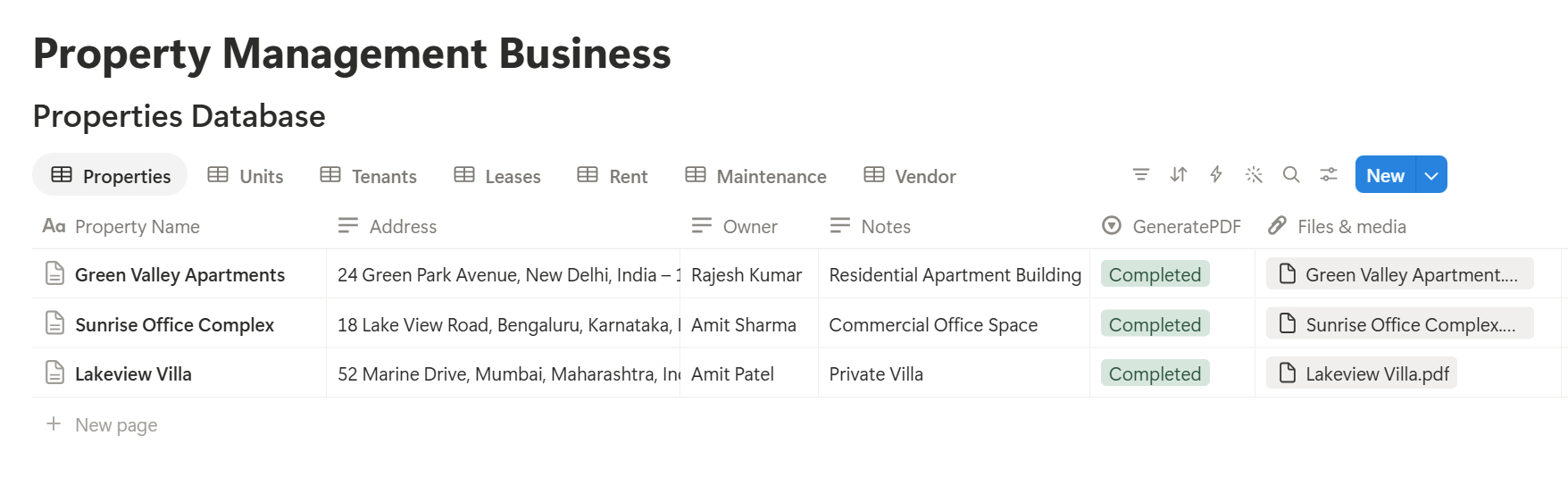
Start with the rent receipt, since you send one every month. Use Preview first and check for empty fields, wrong date formats, and amounts that don’t match your records.
Key Takeaway: Begin with units, leases, and rent. Once you can see who owes what and which leases end soon, the rest of the system is easy to add.
Who Can See What
Your workspace will hold tenant details, rents, and vendor costs, so control access from the start.
Common Mistakes
Keeping the signed lease only in Notion. Store the signed document in a secure document system, and link to it.
Editing past payments. If a payment was recorded wrongly, add a correction with a note, so the history stays honest.
Skipping the renewal flag. A lease that ends without a decision is the most expensive kind of surprise.
Treating flags as legal advice. A Late flag doesn’t tell you what you’re allowed to do next. Check your lease and local law.
Too much tenant information. Collect what you need, keep sensitive scans in a secure system, and don’t keep them longer than the rules allow.
Using the same priority for everything. If every request is Urgent, none is. Define what each priority means.
No owner for the structure. Pick one person responsible for the setup. Properties get renamed and formulas break, so tell that person not to rename properties used in PDF templates, because the placeholders must match exactly.
Skipping a test month. Run one month with made-up tenants first, and fix what annoys you before you use real data.
Frequently Asked Questions
Can Notion be used for property management?
Yes, for small portfolios. It can organize properties, units, tenants, leases, rent, and maintenance. It doesn’t collect rent, screen tenants, or make sure your notices follow the law, so use the right tools for those.
How do I track rent in Notion?
Create a Rent Payments database linked to each lease, with an amount due, an amount paid, and a due date. Add formulas for the balance and a late flag, and make a rent roll view for the current month.
How do I track lease end dates in Notion?
Add an End Date to each lease and a formula that counts the days left and shows a Renewal due flag at a set number of days. Make a view of leases with the flag.
Can tenants submit maintenance requests through Notion?
You can use a Notion form that adds each request to a database without giving the tenant access to your workspace. Check what your plan allows, and give tenants a separate phone number for emergencies.
Can I create rent receipts and statements from Notion?
You can export a page as a PDF, or use a template-based tool such as PDFOutput to fill a receipt template with data from each payment record. Test it on a few sample records first.
Is it safe to store tenant information in Notion?
Notion lets you control who sees each page, but your duties depend on the privacy and tenancy rules where you work. Collect only what you need, keep sensitive scans in a secure document system, and never store bank or card details.
Can I use Notion if I manage property for other owners?
Yes. Add an Owner property to each property, and create monthly owner statements as PDFs. Share only the finished statement with the owner, and not your workspace.
Related Reading
Conclusion
A good property management setup in Notion shows you three things at a glance: who has paid, which leases are ending, and which repairs are still open. Start with units, leases, and rent, use made-up tenants for a month, and fix whatever slows you down. When your receipts, statements, and work orders need to leave Notion, PDFOutput can fill your template from each record and save the PDF to your chosen storage.
Want rent receipts and statements as clean PDFs? Try PDFOutput.