Guides
How to Use Notion for a Nonprofit: Donors, Grants, and Volunteers
Learn how to set up Notion for a nonprofit to manage donors, grants, volunteers, and impact reports, and create PDF receipts and grant reports.
By Sanat Biswal · 2026-10-16 · 5 min read

{/ synced-from-notion — do not edit manually /}
Most small nonprofits have the same problem. The team is small, the work matters, and the records are scattered. Donor names are in a spreadsheet, grant deadlines are in someone’s inbox, volunteer hours are on paper, and the board report is written from memory the night before the meeting.
Notion can bring these records together without a big software budget. This guide covers four jobs a nonprofit has to do well:
It also shows how to turn those records into PDFs such as receipts, thank-you letters, and grant reports.
Short answer: To use Notion for a nonprofit, create linked databases for Donors, Donations, Grants, Volunteers, and Programs.
Use formulas to show each donor’s total giving, flag lapsed donors, track how much of a grant is spent, and add up volunteer hours.
When you need to send something outside your team, such as a donation receipt or a grant report, create a PDF from the record.
In more detail: Notion works well for small and mid-sized nonprofits because you can build only what you need and change it as you learn.
A donor is a record, each gift is a linked record, and a rollup adds up their giving. A grant is a record with an amount, a spend, and a report deadline.
Notion is not accounting software, a payment processor, or a full donor management system, so it works best beside those tools.
For documents that funders, donors, and volunteers receive, you can export a page as a PDF or generate one from a template.
What Notion Can and Can’t Do for a Nonprofit
Notion is good for:
- Keeping donors, gifts, grants, and volunteers in one place.
- Reminding you about report deadlines and renewals.
- Tracking grant spending against the amount awarded.
- Logging volunteer hours.
- Preparing board packs, meeting notes, and impact summaries.
- Creating consistent receipts, letters, and reports.
- Taking online donations or processing payments.
- Bookkeeping or financial statements.
- Mass email campaigns.
- Meeting legal reporting rules by itself.
- Collect less details : Name, contact details, and gift history are usually enough. Avoid storing anything that you don’t need.
- Keep payment details out : Never store card numbers or bank login details in Notion. Keep those details with your payment provider or bank.
- Check the rules : Privacy, fundraising, and consent rules about contacting supporters differ by country and by type of organization. Check what applies to you, and record whether each person agreed to hear from you.
- Donors Database : It stores the people and organizations that give. Add these properties: Name, Type (Individual, Company, or Foundation), Email, Phone, First Gift Date, Can Contact (a checkbox for consent), and Notes.
- Donations Database : It stores each gift details. Add: Donor (relation), Amount, Date, Campaign, Payment Method, and Receipt Sent (a checkbox).
- Grants Database : It stores each funding source details. Add: Grant Name, Funder, Amount Awarded, Amount Spent, Start Date, End Date, Report Due Date, and Status (Applying, Awarded, Reporting, or Closed).
- Volunteers Database : It stores your helpers details. Add: Name, Email, Phone, Skills, Start Date, and Status (Active or Inactive). Add a separate Volunteer Hours database with Volunteer (relation), Date, Hours, and Activity.
- Programs Database : It stores details of what you deliver. Add: Program Name, Lead, Start Date, Status, and Participants Reached (a number you update).
- Thank this week: donors with the Thank flag.
- Lapsed donors: donors with the Lapsed flag, sorted by Total Given, highest first.
- Top donors: donors sorted by Total Given.
- Active volunteers: volunteers with the status Active.
- Hours this month: Volunteer Hours filtered to the current month, grouped by activity.
- Milestones: volunteers whose Total Hours pass a number you choose, such as 50 or 100, so you can thank them.
- Update Participants Reached on each program when something happens, not at year-end.
- Add a short Story property or page to each program, with one real example from the month (with permission, and without identifying details if you don’t have consent).
- Link each program to the grant that funds it, so a grant report can show what that money did.
- Board meeting notes: a database with date, attendees, decisions, and action items.
- Board pack: a page with the latest figures, such as donations this quarter, grants status, and volunteer hours, pulled from your views.
- Policies and procedures: one page for each policy, with an owner and a review date.
- Annual calendar: reporting dates, events, and campaign deadlines.
- Donation receipts and acknowledgements. Notion Receipt Template shows how to build one. Rules for what a receipt must say, especially for tax purposes, differ by country, so check yours.
- Thank-you letters for donors
- Grant reports for funders
- Volunteer certificates and hour summaries
- Board packs and meeting minutes
- Impact reports for supporters
- Event invitations and summaries. How to Use Notion for Event Planners covers planning them.
- Create your template with your logo and layout.
- Add placeholders in double curly braces where the data should go, such as
{{Donor_Name}}or{{Amount}}. - Make sure each placeholder matches the name of a Notion property.
- Start the document with a Notion database button or a status property.
- Ready to Generate creates a PDF from the database record.
- Generate Page converts the Notion page into a PDF.
- Generate PDF and Doc creates a PDF and a Google document.
- Preview creates a Google document so you can check it before making the final PDF.
- Generate E-Signed Doc creates an e-signed PDF in the database workflow.
- Give each person access only to what they need.
- Keep donor giving amounts out of views that volunteers can open.
- Do not share your workspace with funders or donors. Send them a finished PDF.
- Remove access on the day someone leaves.
- Review who has access every few months.
- Write down your rules about what may be stored in Notion.
- How to Use Notion for Event Planners
- How to Use Notion for a School
- Notion Receipt Template
- Notion to Excel
Notion is not made for:
Some software companies offer discounts to nonprofits, so check Notion’s current pricing and any program it offers before you decide on a plan.
Before You Start: Protect Your Supporters’ Data
Donors and volunteers trust you with personal details. Before you add real data, think about three things.
While you are testing, use made-up donors and volunteers.
The Use of 5 Databases
Start with these five. You can add more later.
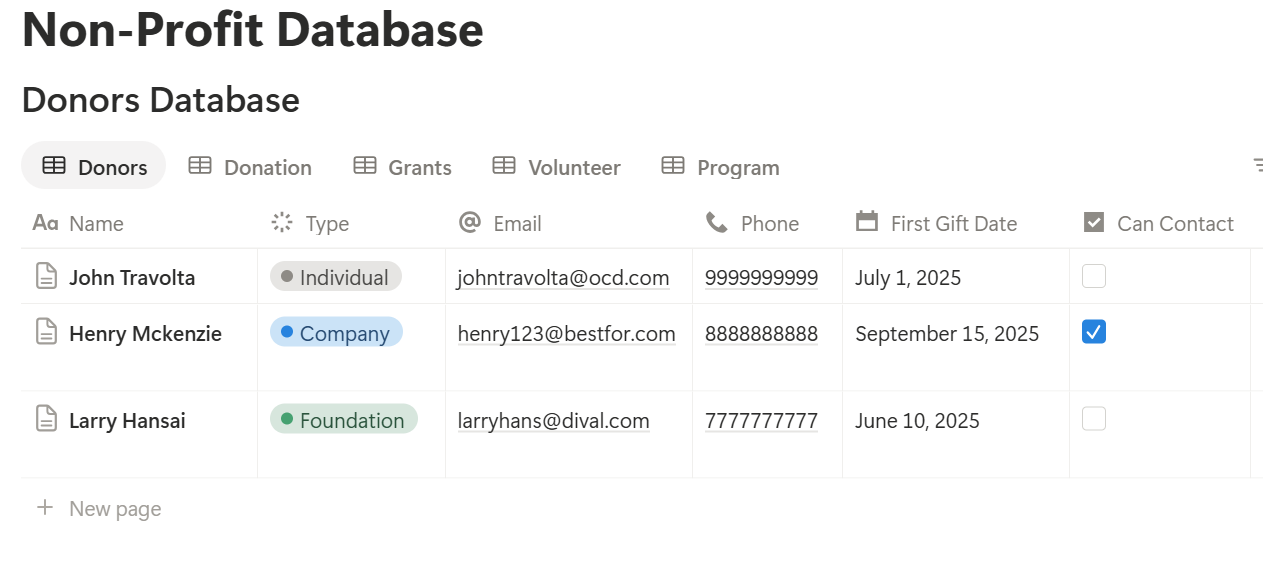
A relation connects a record in one database to a record in another. Link Donations to Donors, Volunteer Hours to Volunteers, and, if you want to see which grant funds which work, Programs to Grants.
Job 1: Look After Your Donors
Keeping a donor is cheaper than finding a new one, and most donors don’t leave because they’re unhappy. They leave because nobody said thank you.
On the Donors database, add two rollups from Donations: one that sums Amount, and one that shows the latest Date. Name them Total Given and Last Gift. Then add these formulas:
Days since gift: dateBetween(now(), prop("Last Gift"), "days") Lapsed flag: if(prop("Days since gift") > 365, "Lapsed", "") Thank-you due: if(prop("Days since gift") <= 7, "Thank", "")
The first formula counts the days since a donor last gave. The second flags anyone who hasn’t given in a year, so someone can reach out personally. The third shows donors whose gift arrived in the last week, so a thank-you goes out promptly. You can change the numbers to match your giving cycle.
Make three views:
Test the formulas with made-up gifts and compare the results with a calendar.
Pro Tip: Send a personal thank-you before any receipt or newsletter. A short note from a real person does more for retention than any automated message.
Job 2: Manage Grants Without Missing a Deadline
Grants bring in money, and they bring in rules. Funders want to see that you spent the money as promised, and they want a report on time. Missing a deadline can hurt your next application.
On the Grants database, add these formulas:
Remaining: prop("Amount Awarded") - prop("Amount Spent") Spent %: if(prop("Amount Awarded") > 0, prop("Amount Spent") / prop("Amount Awarded"), 0) Days to report: dateBetween(prop("Report Due Date"), now(), "days") Report flag: if(prop("Status") != "Closed" and prop("Days to report") < 0, "Overdue", if(prop("Status") != "Closed" and prop("Days to report") <= 30, "Due soon", ""))
Format Spent % as a percent. Here is what two made-up grants might look like:
| Grant | Awarded | Spent | Remaining | Spent % | Report |
|---|---|---|---|---|---|
| Community Reading Fund | 20,000 | 12,500 | 7,500 | 62.5% | Due soon |
| Meals Programme | 15,000 | 14,200 | 800 | 94.7% | None |
Make two views: Reports due (Grants where the flag shows, sorted by date) and Active grants (a board grouped by Status).
Many funders also want a narrative report with numbers on who you reached. If you keep your Programs database up to date, most of the facts are already there.
Job 3: Organize Your Volunteers
Volunteers give their time, so the least you can do is keep track of it properly.
Add a rollup to Volunteers that sums Hours from Volunteer Hours, and name it Total Hours. If you want to see hours for the current year, add a second rollup with a date filter, or use a view that filters Volunteer Hours to this year.
Then make these views:
Use a Notion form for volunteers to log their hours or sign up for shifts. It adds each answer to the right database, so you don’t retype anything. Check what your plan allows.
Volunteer details are personal, so share the full list only with the people who run the volunteer program.
Job 4: Show Your Impact
Funders and donors want to know what their support achieved. If you collect the numbers as you go, the impact report is mostly a matter of putting them in order.
Keep three simple habits:
A calendar view of Programs, and a table view with participants reached, give you a quick picture of the year.
The Board and Admin
Notion also works for the quieter parts of running a nonprofit:
Check what your regulator requires you to keep, and for how long. Notion can hold working copies, but official records may need to live elsewhere.
The Documents That Leave Notion
Funders, donors, and volunteers don’t use your workspace, so some records need to become files:
For a single page, you can use Notion’s export option. How to Export Notion to PDF shows the settings. If you want to move donor or grant data into a spreadsheet for your accountant, Notion to Excel explains how.
Supporters also notice how your documents look, and Notion’s own export gives you limited control over layout. How to Add Your Logo and Brand Colors to Notion PDFs explains how a template solves that.
Generating PDFs with PDFOutput
PDFOutput creates documents from your Notion data using a template. A template can be a Google document, a Word file, a PDF file, or a Notion page. If you already have a receipt or letter layout in Word or Google Docs, you can reuse it.
Here is how it works:
These are some of the status options:
The e-signed option may help with volunteer agreements or board approvals. Whether an electronic signature is valid for a given document depends on your location, so check before you rely on it.
You can save the finished file to a property in your database, so a receipt stays on its donation record. You can also save it to a Google Drive folder and store the link in a property.
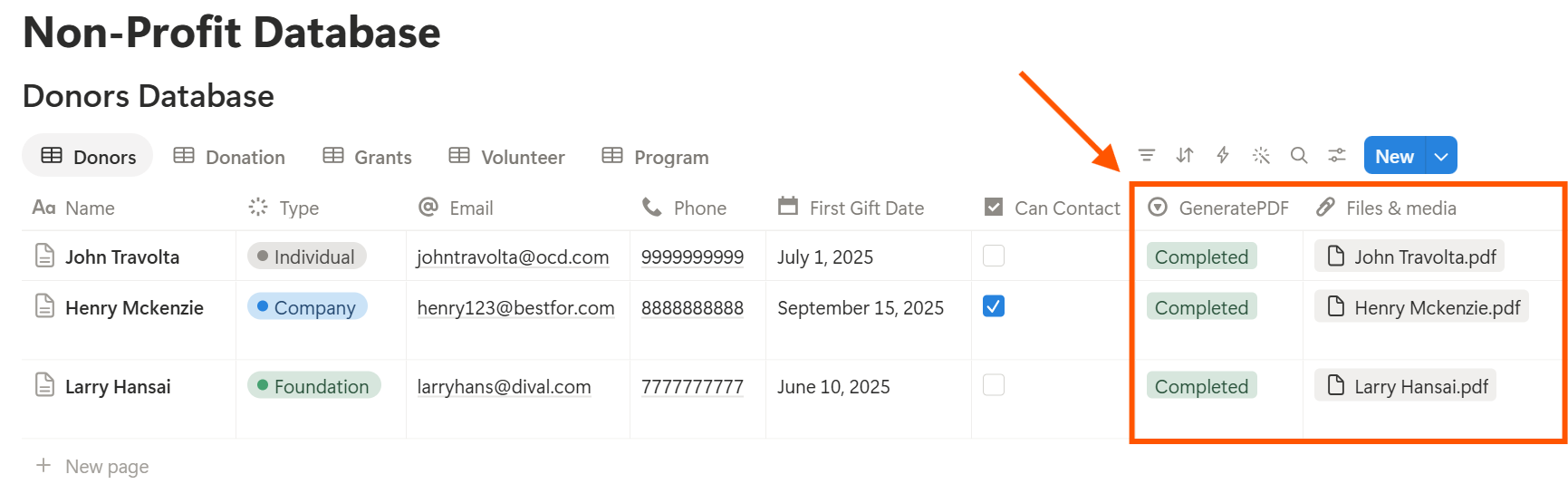
Start with the donation receipt, since you send one for every gift. Use Preview first and check for empty fields, wrong date formats, and amounts that don’t match your records.
Key Takeaway: Start with donors and donations. A thank-you that goes out on time and a receipt that looks professional do more for your supporters than any other piece of the system.
A Realistic First Month
You don’t need to build everything at once. Here is a plan a small team can follow.
| Week | Focus | Result |
|---|---|---|
| 1 | Create the Donors and Donations databases, import your existing list from a spreadsheet, and add the rollups | You can see total giving and last gift for every donor |
| 2 | Add the formulas and the three donor views, and write a receipt template | Thank-yous and lapsed donors are visible at a glance |
| 3 | Add the Grants database and its formulas, then enter every active grant | No report deadline is a surprise |
| 4 | Add Volunteers and Volunteer Hours, test everything with a few real records, and set access | One shared place for supporters, grants, and helpers |
Who Can See What
Your workspace will hold donor details, funder terms, and volunteer information, so control access from the start.
Frequently Asked Questions
Can Notion be used for a nonprofit?
Yes. It can organize donors, donations, grants, volunteers, programs, and board materials. It doesn’t process payments or replace accounting software, so use it beside those tools.
How do I track donors in Notion?
Create a Donors database and a Donations database linked to it. Add a rollup that sums each donor’s gifts and one that shows the latest gift date, then add formulas that flag lapsed donors.
How do I track grants in Notion?
Create a Grants database with the amount awarded, the amount spent, and a report due date. Add formulas for the remaining amount, the percent spent, and a flag when a report is due soon.
Can I track volunteer hours in Notion?
Yes. Create a Volunteer Hours database linked to each volunteer, with a date and hours, and add a rollup that sums the hours.
Can I create donation receipts from Notion?
You can export a page as a PDF, or use a template-based tool such as PDFOutput to fill a receipt template with the data from each donation record. Check what your local rules say a receipt must include, and test the layout on sample records first.
Does Notion offer a discount for nonprofits?
Some software providers do. Check Notion’s current pricing and program details to see what is available to your organization.
Is it safe to store donor information in Notion?
Notion lets you control who sees each page, but your duties depend on the privacy rules where you work. Collect only what you need, keep payment details out, and record consent for contact.
Related Reading
Conclusion
A good nonprofit setup in Notion does four things: it helps you thank donors on time, keeps grant reports from slipping, tracks the hours your volunteers give, and gathers the numbers for your impact report. Start with donors and donations, add grants next, and use made-up data until you’ve settled privacy and access. When your receipts, letters, and reports need to leave Notion, PDFOutput can fill your template from each record and save the PDF to your chosen storage.
Want receipts and grant reports as clean PDFs? Try PDFOutput.