Guides
How to Use Notion for a Hotel: Bookings, Housekeeping, and Guest Requests
Learn how to set up Notion for a small hotel or guesthouse with bookings, housekeeping, guest requests, and maintenance, plus PDF confirmations and invoices.
By Sanat Biswal · 2026-10-17 · 5 min read

{/ synced-from-notion — do not edit manually /}
A small hotel runs on handoffs.
The front desk tells housekeeping a room is free. Housekeeping tells the front desk it’s ready. A guest asks for extra towels, and the message gets lost between two phones.
When everything passes through a whiteboard, a chat group, and someone’s memory, mistakes are only a matter of time.
Notion can give each department one shared place to look. This guide is for small hotels, guesthouses, and bed and breakfasts. It shows how to set up bookings, housekeeping, guest requests, and maintenance, and how to turn the records into PDFs such as booking confirmations and invoices.
The advice is a general information about organizing a business, not legal advice.
Short answer: To use Notion for a small hotel, create linked databases for Rooms, Guests, Bookings, Housekeeping Tasks, Guest Requests, and Maintenance Issues.
Use formulas to calculate nights, totals, and balances, and views to show today’s arrivals, departures, and rooms to clean. When you need to give a guest a document, such as a confirmation or an invoice, create a PDF from the record.
In more detail: Notion works well for hotels with roughly 5 to 40 rooms as a shared operations workspace. Each room, guest, and booking is a record, and the records are linked, so a booking shows its guest and room, and a room shows its booking history and cleaning status.
Notion isn’t a property management system. It doesn’t sell rooms online, sync with booking sites, take payments, or prevent double bookings by itself. It works best beside those tools.
For documents that guests receive, you can export a page as a PDF or generate one from a template.
Table of Contents
What Notion Can and Can’t Do for a Hotel
Notion is good for:
- Keeping rooms, guests, and bookings in one place.
- Showing each department what to do today.
- Tracking room status from checkout to ready.
- Logging guest requests and how fast you respond.
- Recording maintenance problems.
- Creating consistent confirmations, invoices, and checklists.
- Selling rooms online or syncing with booking sites.
- Taking card payments.
- Stopping two guests from being booked into the same room.
- Controlling door locks or key cards.
- Never store card numbers or security codes in Notion. Keep payment details with your payment provider.
- Be careful with ID documents. Passport and ID details are sensitive. Some places require hotels to keep guest registration records, and the rules about what to collect, where to store it, and for how long differ by country. Check yours, and use the system your local rules call for.
- Collect less. Name, contact details, dates, and special requests are usually enough for daily operations.
- Treat requests as personal. A note about a medical need or a religious meal can be sensitive. Share it only with the staff who need it.
- Rooms stores each room. Add these properties: Room Number, Type (Single, Double, Suite), Floor, Rate per Night, Status (Occupied, Checking Out, Cleaning, Ready, or Out of Order), and Notes.
- Guests stores who stays. Add: Name, Email, Phone, Country, Preferences, and a checkbox for Repeat Guest. Keep sensitive details out unless your local rules require them.
- Bookings is the main database. Add: Booking Number (a Unique ID with a prefix like BK), Guest (relation), Room (relation), Check-in, Check-out, Adults, Source (Direct, Phone, or Booking Site), Status (Confirmed, Checked In, Checked Out, or Cancelled), Deposit Paid, and Notes.
- Housekeeping Tasks stores cleaning jobs. Add: Room (relation), Task Type (Checkout Clean, Daily Service, or Deep Clean), Assigned To, Status (To Do, In Progress, or Done), and Completed At.
- Guest Requests stores what guests ask for. Add: Room (relation), Request, Type (Housekeeping, Food, Maintenance, or Other), Requested At, Completed At, and Status (New, In Progress, or Done).
- Maintenance Issues stores problems. Add: Room (relation), Issue, Priority (Low, Medium, or Urgent), Reported On, Status (Open, In Progress, or Fixed), and Fixed On.
- Arriving today: Bookings with a check-in of today and status Confirmed.
- Departing today: Bookings with a check-out of today and status Checked In.
- In house: Bookings with status Checked In.
- Unpaid balances: Bookings where Balance is above zero and status is Checked In or Checked Out.
- Room calendar: a timeline view of Bookings grouped by Room, showing each stay as a bar.
- Checking Out means the guest has left, so clean next.
- Cleaning means someone is in the room now.
- Ready means the front desk can offer it.
- Out of Order means don’t sell it.
- To clean now: rooms with status Checking Out or Cleaning.
- My tasks: tasks assigned to each person.
- Arriving rooms: rooms with a booking arriving today that aren’t Ready yet, so the team knows what to hurry.
- Booking confirmations: dates, room, rate, and policies
- Invoices and receipts: what the guest paid. Notion Receipt Template shows how to structure one.
- Registration cards, if your local rules call for them (check the wording and storage rules)
- Daily arrivals and departures lists: a printable sheet for the front desk
- Housekeeping sheets: a printable list of rooms to clean
- Maintenance work orders for outside contractors
- Welcome letters with Wi-Fi details, breakfast times, and local tips
- Create your template with your logo and layout.
- Add placeholders in double curly braces where the data should go, such as
{{Guest_Name}}or{{Check-in}}. - Make sure each placeholder matches the name of a Notion property.
- Start the document with a Notion database button or a status property.
- Ready to Generate creates a PDF from the database record.
- Generate Page converts the Notion page into a PDF.
- Generate PDF and Doc creates a PDF and a Google document.
- Preview creates a Google document so you can check it before making the final PDF.
- Generate E-Signed Doc creates an e-signed PDF in the database workflow.
- Give housekeeping access to room status and tasks, not guest contact details or payments.
- Keep rates, balances, and guest notes out of views that other staff don’t need.
- Give maintenance access to issues and room numbers only.
- Don’t give guests access to your workspace. Send them a finished PDF.
- Remove access on the day someone leaves.
- Review who has access every few months.
- How to Use Notion for a Restaurant
- How to Use Notion for Event Planners
- How to Use Notion for a Gym or Fitness Studio
- Notion Receipt Template
Notion is not made for:
If you already use a booking engine or channel manager, treat Notion as the operations layer beside it. Copy confirmed bookings in, and let the other tools handle availability and payments.
Guest Privacy Comes First
Hotels hold more personal information than most businesses. Before you add real data to any tool, think carefully.
While you are testing, use made-up guests.
Use These 6 Databases
Start with these 6 databases. You can add more later.
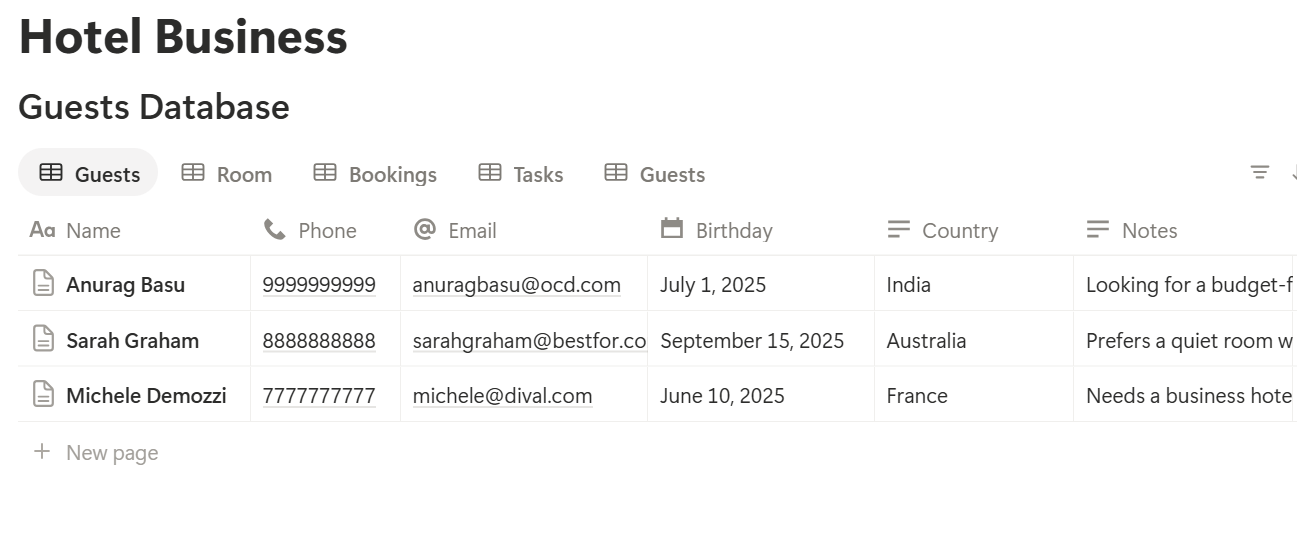
A relation connects a record in one database to a record in another. Link Bookings to Guests and Rooms, and link the other three databases to Rooms. Now a room page shows its bookings, cleaning history, requests, and issues together.
Front Desk: Bookings, Arrivals, and Departures
The front desk lives on three questions: who arrives today, who leaves today, and what does each guest owe?
Formulas for Bookings
Nights: dateBetween(prop("Check-out"), prop("Check-in"), "days") Total: prop("Nights") * prop("Rate") Balance: prop("Total") - prop("Deposit Paid")
Bring the room’s rate into the booking with a rollup from the linked room, and name it Rate. Format Total and Balance as currency. Here is one made-up booking:
| Item | Value |
|---|---|
| Room | 204, Double |
| Check-in | 10 June |
| Check-out | 13 June |
| Nights | 3 |
| Rate per night | 90 |
| Total | 270 |
| Deposit paid | 90 |
| Balance | 180 |
Views for Bookings
About Double Bookings
Notion can’t stop two bookings from overlapping on the same room. The timeline view makes overlaps easy to see, because two bars sit on top of each other in one room’s row. Check it whenever you add a booking by hand. If you take bookings through a booking site, let that tool handle availability, and copy only confirmed bookings into Notion.
Pro Tip: Add a "Checked by" and a date to any booking you edit by hand. It makes mix-ups easier to trace.
Housekeeping: Room Status and Cleaning
Housekeeping needs to know one thing first thing in the morning: which rooms to clean, in what order?
When a guest checks out, the front desk changes the room’s Status to Checking Out, then Cleaning. A board view of Rooms grouped by Status gives housekeeping a live picture:
Add a Housekeeping Tasks database so you can assign work and see who did what. Create a template for each task type, with a short checklist: strip beds, clean bathroom, restock supplies, check minibar, report damage. Keep the list short, so it gets done properly.
Add a formula on Housekeeping Tasks if you want to see how long cleaning takes. Record a Started At time as well as Completed At, and use:
Minutes: dateBetween(prop("Completed At"), prop("Started At"), "minutes")
After a few weeks, the averages show how long a checkout clean really takes, which helps you plan staffing.
Make views for the housekeeping team:
Guest Requests: Nothing Gets Lost
A request sent through three different channels is one that nobody owns. Put it in one place.
Anyone on staff who hears a request logs it as a record with the room, what was asked, and the time. Add Requested At and Completed At, then use:
Response (min): dateBetween(prop("Completed At"), prop("Requested At"), "minutes") Late flag: if(prop("Status") != "Done" and dateBetween(now(), prop("Requested At"), "minutes") > 30, "Late", "")
The late flag shows any open request older than 30 minutes. Change the number to match your standards. A view called Open requests, sorted by oldest first, becomes the shared to-do list for the whole team.
A Notion form can make logging faster, since staff can add a request from a phone. Check what your plan allows, and test it on the devices your team uses. Notion’s mobile app has fewer options than the desktop version.
Over time, group requests by type. If towels are requested every day, they should be in the room already. Patterns in the log point to small fixes that make guests happier.
Maintenance: Fix It Before the Guest Finds It
Every hotel has a dripping tap somewhere. The question is whether anyone knows.
Log each problem in Maintenance Issues with the room, a priority, and the date. A board view grouped by Status gives the maintenance person a clear list. When a problem is serious enough that the room can’t be sold, change the room’s Status to Out of Order, so the front desk doesn’t offer it.
A rollup on Rooms that counts open issues, named Open Issues, lets you see at a glance which rooms have problems. If one room keeps appearing, that’s worth investigating.
Add a short Pre-arrival check template for the rooms you’re about to sell: lights, air conditioning, water, TV, locks, and smoke detectors. Check what your local rules require for safety inspections, because working records in Notion may not satisfy a legal requirement by themselves.
A Day at a 20-Room Hotel
To see how the pieces fit, here is one made-up day at a small hotel.
7:30 am. The front desk opens the Departing today view. Six guests check out today. The manager checks the Unpaid balances view and sees two guests with a balance to settle.
9:00 am. As guests leave, the front desk changes each room to Checking Out. The housekeeping board fills up. Housekeeping starts with the three rooms where a guest is arriving this afternoon, which the Arriving rooms view highlights.
11:15 am. A guest in room 108 calls to ask for an extra pillow. The front desk logs it in two clicks. Housekeeping sees it in Open requests and delivers it.
1:00 pm. Housekeeping marks rooms Ready as they finish. The front desk can now see exactly which rooms can be offered to early arrivals.
2:30 pm. A maintenance issue is logged for room 205, a leaking tap. It’s medium priority, so the room stays on sale, but the issue is on tomorrow’s list.
4:00 pm. Guests arrive. The Arriving today view shows each booking, the room, and any notes. The front desk checks the preferences on the guest record before greeting each one.
9:00 pm. The night manager checks that every request is Done and every departed room is Ready or Cleaning for tomorrow.
Nobody had to ask who was doing what.
The Documents That Leave Notion
Guests and suppliers don’t use your workspace, so several records need to become files:
For a single page, you can use Notion’s export option. How to Export Notion to PDF shows the settings, and How to Export a Notion Database to PDF helps with tables, such as an arrivals list. Guests judge your hotel partly by your paperwork, and Notion’s own export gives you limited control over layout. How to Add Your Logo and Brand Colors to Notion PDFs explains how a template solves that.
Generating PDFs with PDFOutput
PDFOutput creates documents from your Notion data using a template. A template can be a Google document, a Word file, a PDF file, or a Notion page. If you already have a confirmation or invoice layout in Word or Google Docs, you can reuse it.
Here is how it works:
These are some of the status options:
The e-signed option may help with registration cards or policy acknowledgements. Whether an electronic signature is valid for a given document depends on your location, so check before you rely on it. You can save the finished file to a property in your database, so a confirmation stays on its booking record. You can also save it to a Google Drive folder and store the link in a property.
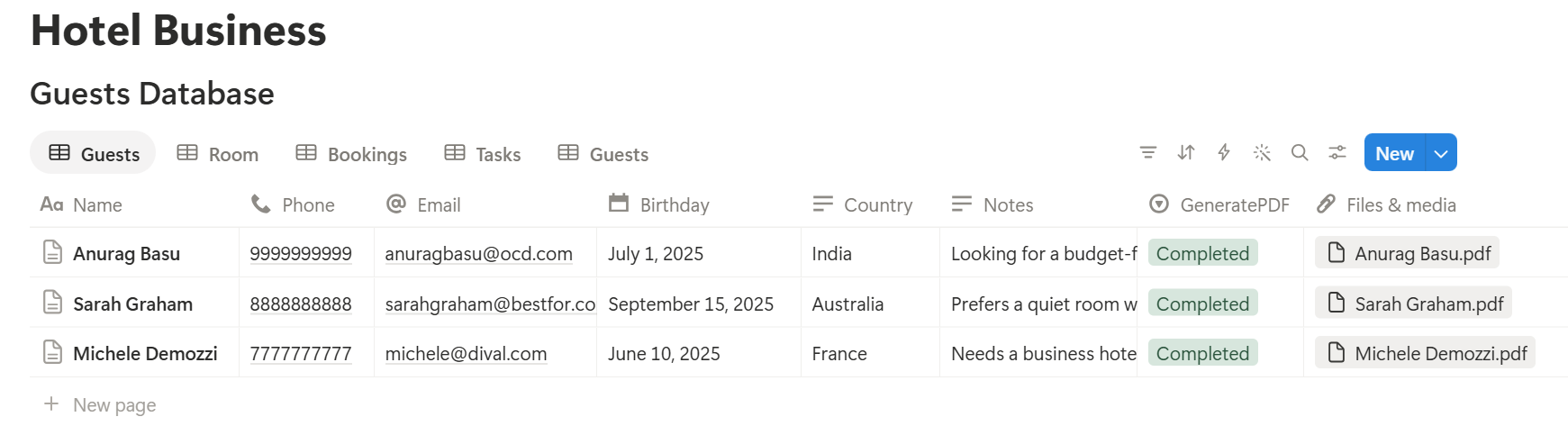
Start with the booking confirmation, since every guest gets one. Use Preview first and check for empty fields, wrong date formats, and totals that don’t match your records.
Key Takeaway: Start with rooms, bookings, and room status. If the front desk and housekeeping both look at the same board, most daily mix-ups disappear.
Who Can See What
Your workspace will hold guest details, rates, and staff information, so control access from the start.
Common Mistakes
Copying everything from your booking system. Bring over only what operations need. Less data is less to protect.
Letting room status go stale. The housekeeping board only helps if the front desk updates statuses at checkout. Make it part of the checkout routine.
Too many statuses. Five room statuses are plenty. More statuses mean more clicks, and staff will skip them.
Treating Notion like an availability tool. It shows what people enter. Let your booking engine handle what’s available to sell.
Long checklists. People tick boxes without checking. Keep each list short.
No owner for the setup. Pick one person responsible for the structure. Properties get renamed and formulas break, so tell that person not to rename properties used in PDF templates, because the placeholders must match exactly.
Skipping a test week. Run a week with made-up guests first, and fix what annoys the front desk before you use real data.
Frequently Asked Questions
Can Notion be used to run a hotel?
For small hotels, guesthouses, and bed and breakfasts, Notion can organize bookings, room status, housekeeping, guest requests, and maintenance. It isn’t a property management system, so it doesn’t sell rooms, sync with booking sites, or take payments.
How do I track room status in Notion?
Add a Status property to a Rooms database with options such as Occupied, Checking Out, Cleaning, Ready, and Out of Order. Then make a board view grouped by status for housekeeping and the front desk.
Can Notion prevent double bookings?
No. A timeline view of bookings grouped by room makes overlaps visible, but it doesn’t block them. Let your booking engine or channel manager handle availability.
How do I log guest requests in Notion?
Create a Guest Requests database linked to rooms, with a request, a type, and requested and completed times. Add a formula that flags open requests older than a set number of minutes.
Can I create booking confirmations from Notion?
You can export a page as a PDF, or use a template-based tool such as PDFOutput to fill a confirmation template with data from each booking record. Test it on a few sample records first.
Is it safe to store guest information in Notion?
Notion lets you control who sees each page, but your duties depend on the rules where you work. Collect only what you need, keep card details out, and check your local rules for ID and registration records.
Can housekeeping staff use Notion on their phones?
Notion has a mobile app, though some actions are easier on a computer. Test your housekeeping board on the phones your team actually uses.
Related Reading
Conclusion
A good hotel setup in Notion gives every department one shared view: the front desk sees arrivals and balances, housekeeping sees which rooms to clean, and everyone sees open guest requests. Start with rooms, bookings, and room status, use made-up guests for a week, and fix whatever slows the team down. When your confirmations and invoices need to leave Notion, PDFOutput can fill your template from each record and save the PDF to your chosen storage.
Want booking confirmations and invoices as clean PDFs? Try PDFOutput.